> ## Documentation Index
> Fetch the complete documentation index at: https://docs.lpagent.io/llms.txt
> Use this file to discover all available pages before exploring further.
# 通知
> 仓位平仓,或者跟单开仓、平仓、失败时收到推送
LP Agent 可以给你的手机或电脑发推送通知,就算标签页关着也能收到。
## 打开通知
在账户面板里按 **Settings**,再点 **Account** 标签页。
浏览器会请求权限。点允许。
每台设备要单独订阅。如果你看到 "Notifications are on, but this device isn't receiving them yet"(通知已开启,但这台设备还没收到),按 **Enable on this device**。
按 **Send test notification**。
你也可以在 **Copy LP** 页面顶部的横幅上按 **Turn on**。
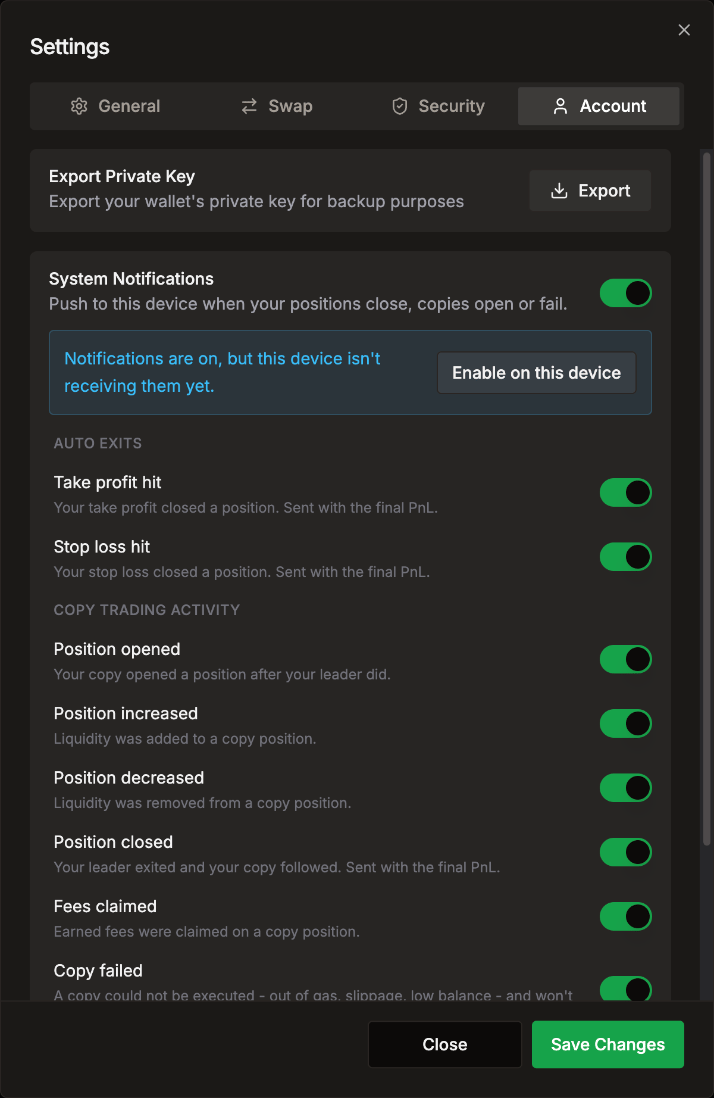 Settings > Account:System Notifications 和每种事件的开关
## 可以收到哪些通知
打开 System Notifications 后,所有事件默认都是开的。把你不想要的关掉就行。
| 分组 | 事件 | 什么时候 |
| - | - | - |
| **Auto exits** | **Take profit hit** | 你的止盈平掉了一个仓位。附带最终盈亏(PnL)。 |
| | **Stop loss hit** | 你的止损平掉了一个仓位。附带最终盈亏。 |
| **Copy trading activity** | **Position opened** | 带单钱包开仓后,你的跟单也开了仓。 |
| | **Position increased** | 跟单仓位添加了流动性。 |
| | **Position decreased** | 跟单仓位移除了流动性。 |
| | **Position closed** | 带单钱包退出了,你的跟单也跟着退出。附带最终盈亏。 |
| | **Fees claimed** | 跟单仓位领取了手续费。 |
| | **Copy failed** | 跟单没能完成,比如没 Gas、滑点或余额不足。 |
| | **Copy skipped** | 你的筛选拒绝了一次跟单,比如代币质量下限或被屏蔽的池子。 |
如果 LP Agent 因为你的代理钱包没钱而暂停了你的跟单,你也会收到推送。
## iPhone 和 iPad
iOS 只给添加到主屏幕的应用发推送通知:
1. 用 Safari 打开 [app.lpagent.io](https://app.lpagent.io)。
2. 点 **Share**(分享),再点 **Add to Home Screen**(添加到主屏幕)。
3. 从主屏幕打开 LP Agent,在那里打开通知。
## 关闭通知
关掉 **System Notifications**,或者单独关掉某些事件。按 **Disconnect** 也会移除这台设备的订阅。
Settings > Account:System Notifications 和每种事件的开关
## 可以收到哪些通知
打开 System Notifications 后,所有事件默认都是开的。把你不想要的关掉就行。
| 分组 | 事件 | 什么时候 |
| - | - | - |
| **Auto exits** | **Take profit hit** | 你的止盈平掉了一个仓位。附带最终盈亏(PnL)。 |
| | **Stop loss hit** | 你的止损平掉了一个仓位。附带最终盈亏。 |
| **Copy trading activity** | **Position opened** | 带单钱包开仓后,你的跟单也开了仓。 |
| | **Position increased** | 跟单仓位添加了流动性。 |
| | **Position decreased** | 跟单仓位移除了流动性。 |
| | **Position closed** | 带单钱包退出了,你的跟单也跟着退出。附带最终盈亏。 |
| | **Fees claimed** | 跟单仓位领取了手续费。 |
| | **Copy failed** | 跟单没能完成,比如没 Gas、滑点或余额不足。 |
| | **Copy skipped** | 你的筛选拒绝了一次跟单,比如代币质量下限或被屏蔽的池子。 |
如果 LP Agent 因为你的代理钱包没钱而暂停了你的跟单,你也会收到推送。
## iPhone 和 iPad
iOS 只给添加到主屏幕的应用发推送通知:
1. 用 Safari 打开 [app.lpagent.io](https://app.lpagent.io)。
2. 点 **Share**(分享),再点 **Add to Home Screen**(添加到主屏幕)。
3. 从主屏幕打开 LP Agent,在那里打开通知。
## 关闭通知
关掉 **System Notifications**,或者单独关掉某些事件。按 **Disconnect** 也会移除这台设备的订阅。