> ## Documentation Index
> Fetch the complete documentation index at: https://docs.lpagent.io/llms.txt
> Use this file to discover all available pages before exploring further.
# Smart LP
> Find wallets that make money from LP fees, and copy them
**Smart LP** is the leaderboard of liquidity providers worth following. It is the first page you see when you open LP Agent.
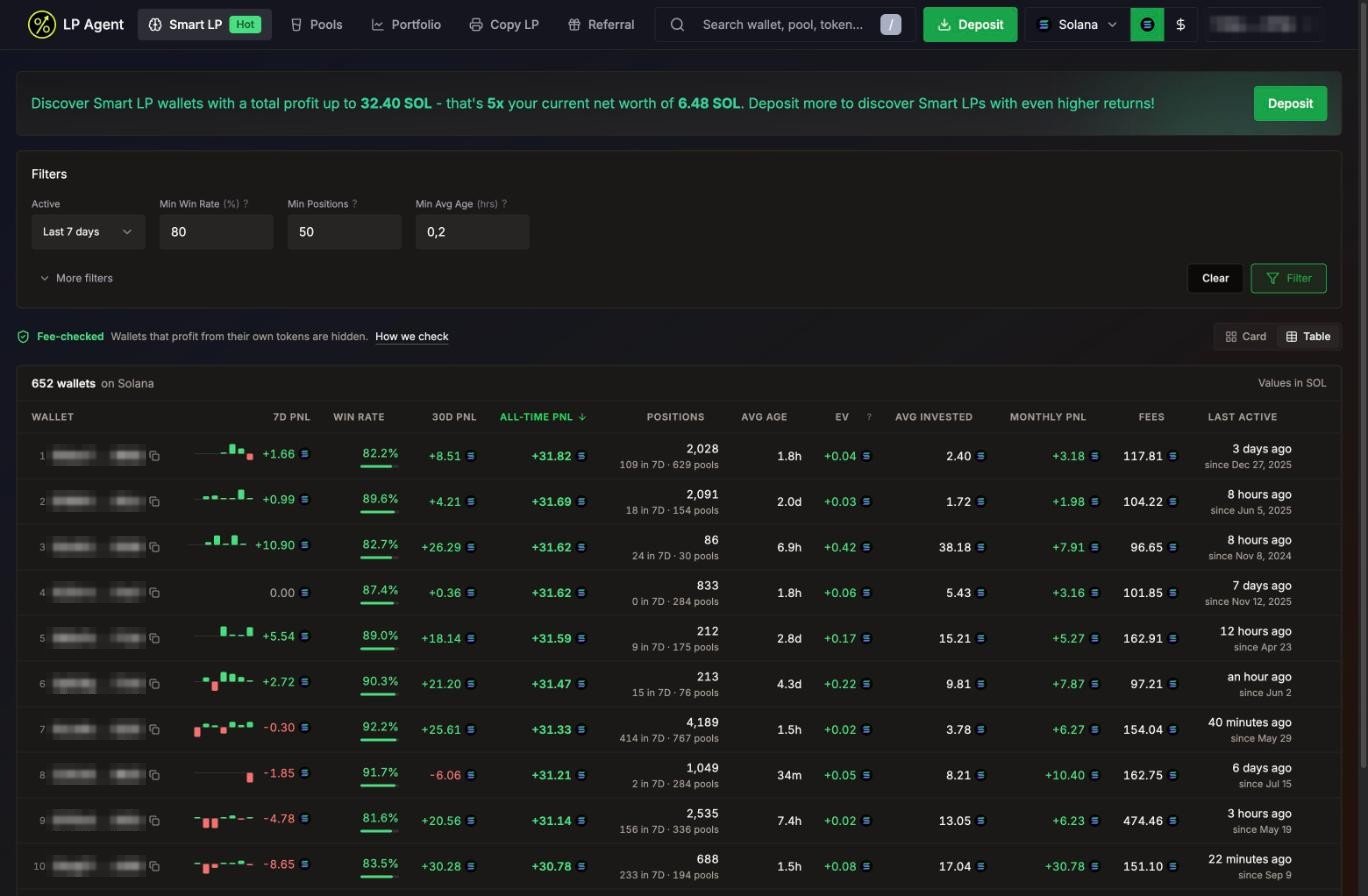 Smart LP on Solana, table view
## What it ranks
| Network | Ranked on |
| - | - |
| Solana | Meteora DLMM positions |
| Robinhood Chain | Uniswap V3 and V4 positions |
Switch network with the chain picker in the header. Values show in SOL, ETH or USD, following the **\$** toggle.
### Fee-checked wallets only
Some wallets look great on paper because they launch a token, seed its pool and pull the liquidity, not because they earn LP fees. Smart LP hides them.
**Fee-checked** means: if a wallet's LP fees are **under 10% of its profit**, the profit came from token price (usually a token it launched itself), and the wallet is not listed. Press **How we check** on the page for the full explanation.
### Sized to your wallet (Solana)
On Solana, Smart LP shows wallets whose total profit is up to **5x your net worth** (never less than 20 SOL). The banner at the top says where your cap is. Deposit more to see bigger wallets. On Robinhood Chain the list is not capped.
## Reading the table
Switch between **Card** and **Table** view at the top right.
| Column | What it means |
| - | - |
| **7D PnL** | Profit over the last 7 days, with a daily bar chart |
| **Win rate** | Share of closed positions that made money. Green at 70% or more, red under 50% |
| **30D PnL** / **All-time PnL** | Profit over 30 days and all time |
| **Positions** | Total positions, plus how many in the last 7 days and across how many pools |
| **Avg age** | How long the wallet usually holds a position |
| **EV** | Expected value per position: (win rate x average win) + (loss rate x average loss), where the average loss is negative |
| **Avg invested** | Average size of a position |
| **Monthly PnL** | Average profit per month |
| **Fees** | Total LP fees earned |
| **Last active** | When the wallet last traded, and since when it has been active |
Click a column header to sort (click again to flip the order), or use the sort chips in card view. The default sort is **All-time PnL**.
Look at **Avg age** before you copy. Every copied position costs a swap in, a swap back and network fees. A wallet that flips positions in a few minutes makes you pay that cost again and again. The copy dialog warns you when a wallet holds for less than 18 minutes on Solana or 1 hour on Robinhood Chain.
## Filters
| Filter | Default |
| - | - |
| **Active** (Last 24h, Last 7 days, Last 30 days, Any time) | Last 7 days |
| **Min Win Rate (%)** | 80 |
| **Min Positions** | 50 |
| **Min Avg Age (hrs)** | 0.2 |
| **More filters**: Min Profit, Min Monthly Profit, Min Expected Value, Min Fees Earned, First Activity Before | Empty |
Press **Filter** to apply. Your filters are saved in this browser. **Clear** resets them.
## Copy a wallet
Click a row or card to open the wallet's portfolio. Check its open and closed positions, PnL history and fees.
The button sits next to the wallet address. It opens the [copy settings](/features/copy-settings).
You can only copy wallets on your account's network. If you already copy a wallet, its portfolio shows a pill with your copy size and exit rules instead; click it to edit.
Smart LP on Solana, table view
## What it ranks
| Network | Ranked on |
| - | - |
| Solana | Meteora DLMM positions |
| Robinhood Chain | Uniswap V3 and V4 positions |
Switch network with the chain picker in the header. Values show in SOL, ETH or USD, following the **\$** toggle.
### Fee-checked wallets only
Some wallets look great on paper because they launch a token, seed its pool and pull the liquidity, not because they earn LP fees. Smart LP hides them.
**Fee-checked** means: if a wallet's LP fees are **under 10% of its profit**, the profit came from token price (usually a token it launched itself), and the wallet is not listed. Press **How we check** on the page for the full explanation.
### Sized to your wallet (Solana)
On Solana, Smart LP shows wallets whose total profit is up to **5x your net worth** (never less than 20 SOL). The banner at the top says where your cap is. Deposit more to see bigger wallets. On Robinhood Chain the list is not capped.
## Reading the table
Switch between **Card** and **Table** view at the top right.
| Column | What it means |
| - | - |
| **7D PnL** | Profit over the last 7 days, with a daily bar chart |
| **Win rate** | Share of closed positions that made money. Green at 70% or more, red under 50% |
| **30D PnL** / **All-time PnL** | Profit over 30 days and all time |
| **Positions** | Total positions, plus how many in the last 7 days and across how many pools |
| **Avg age** | How long the wallet usually holds a position |
| **EV** | Expected value per position: (win rate x average win) + (loss rate x average loss), where the average loss is negative |
| **Avg invested** | Average size of a position |
| **Monthly PnL** | Average profit per month |
| **Fees** | Total LP fees earned |
| **Last active** | When the wallet last traded, and since when it has been active |
Click a column header to sort (click again to flip the order), or use the sort chips in card view. The default sort is **All-time PnL**.
Look at **Avg age** before you copy. Every copied position costs a swap in, a swap back and network fees. A wallet that flips positions in a few minutes makes you pay that cost again and again. The copy dialog warns you when a wallet holds for less than 18 minutes on Solana or 1 hour on Robinhood Chain.
## Filters
| Filter | Default |
| - | - |
| **Active** (Last 24h, Last 7 days, Last 30 days, Any time) | Last 7 days |
| **Min Win Rate (%)** | 80 |
| **Min Positions** | 50 |
| **Min Avg Age (hrs)** | 0.2 |
| **More filters**: Min Profit, Min Monthly Profit, Min Expected Value, Min Fees Earned, First Activity Before | Empty |
Press **Filter** to apply. Your filters are saved in this browser. **Clear** resets them.
## Copy a wallet
Click a row or card to open the wallet's portfolio. Check its open and closed positions, PnL history and fees.
The button sits next to the wallet address. It opens the [copy settings](/features/copy-settings).
You can only copy wallets on your account's network. If you already copy a wallet, its portfolio shows a pill with your copy size and exit rules instead; click it to edit.
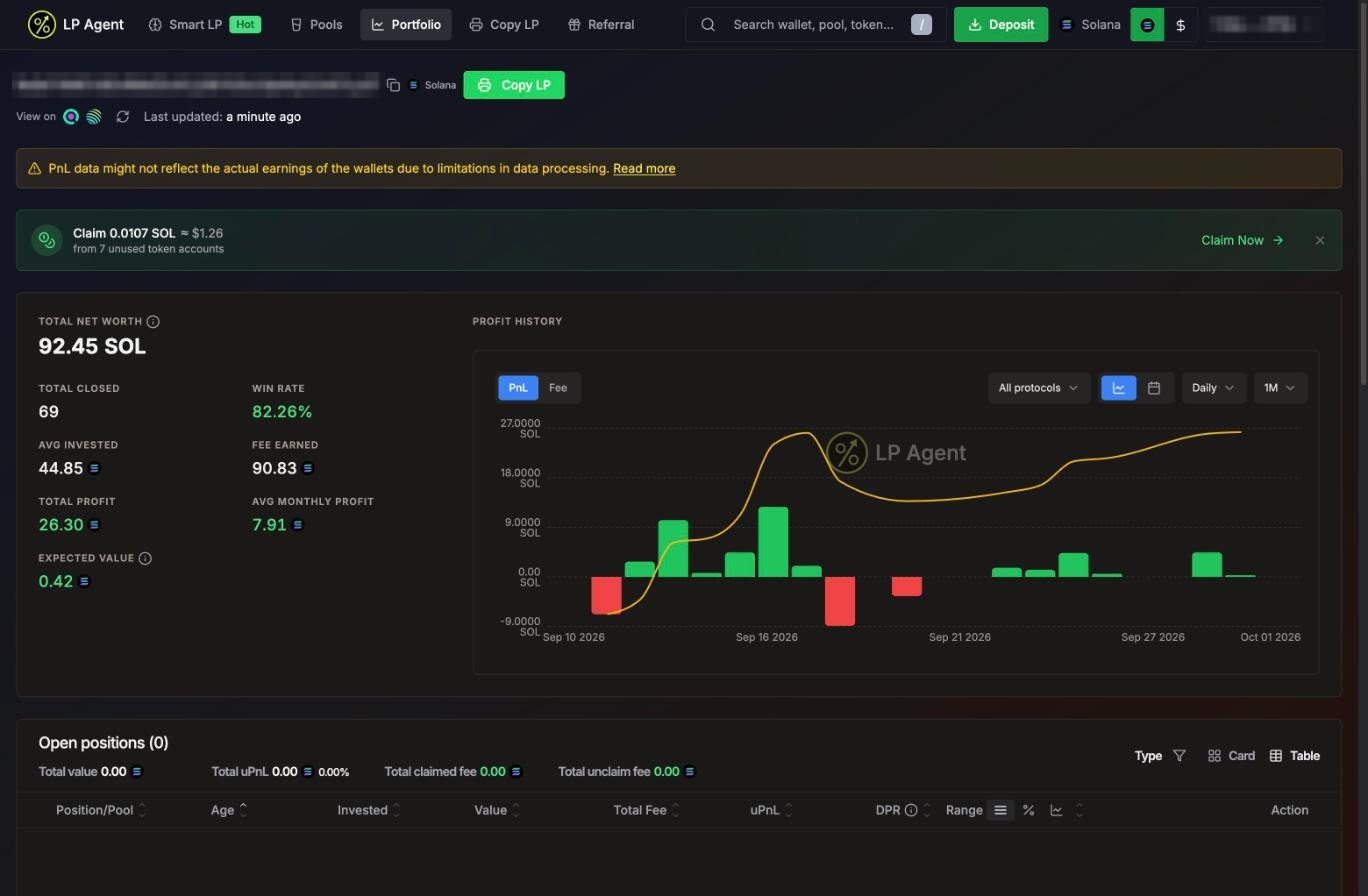 A Smart LP wallet's portfolio. Copy LP is next to the address.
## When copying is off for a wallet (Robinhood Chain)
On Robinhood Chain, LP Agent also checks each leader's history. If a wallet's profit does not come from LP fees, or it mostly LPs into pools of tokens it launched itself, its portfolio shows **Copy is off for this wallet** with the reason, and the copy button reads **Copy off**.
* You can't start a new copy of that wallet.
* If you already copy it, **new copies are skipped**, but your open copies still follow its exits. The wallet shows **New copies off** in your Copied Wallets list.
Separately, a single copy is skipped when the leader opens a brand-new pool for a token with no price and holds nearly all of its liquidity. Copy Logs shows it as **Leader's own token launch**.
A Smart LP wallet's portfolio. Copy LP is next to the address.
## When copying is off for a wallet (Robinhood Chain)
On Robinhood Chain, LP Agent also checks each leader's history. If a wallet's profit does not come from LP fees, or it mostly LPs into pools of tokens it launched itself, its portfolio shows **Copy is off for this wallet** with the reason, and the copy button reads **Copy off**.
* You can't start a new copy of that wallet.
* If you already copy it, **new copies are skipped**, but your open copies still follow its exits. The wallet shows **New copies off** in your Copied Wallets list.
Separately, a single copy is skipped when the leader opens a brand-new pool for a token with no price and holds nearly all of its liquidity. Copy Logs shows it as **Leader's own token launch**.