> ## Documentation Index
> Fetch the complete documentation index at: https://docs.lpagent.io/llms.txt
> Use this file to discover all available pages before exploring further.
# Portfolio
> Net worth, PnL history and every position, for your wallet or any wallet
**Portfolio** shows your agent wallet by default. You can also look up any wallet: paste an address in the search box, or open a wallet from Smart LP or a pool page. Other wallets are read-only.
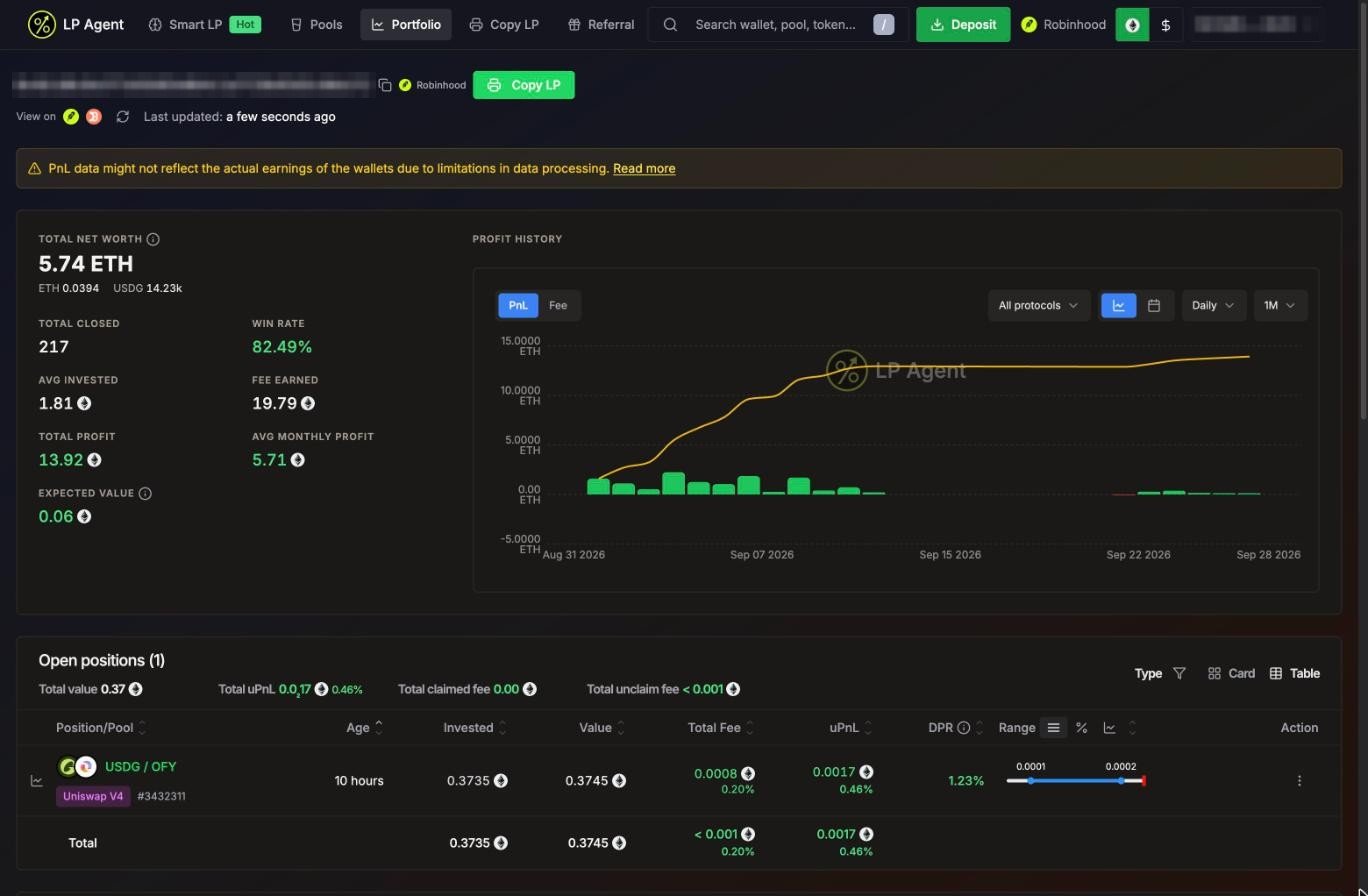 A portfolio on Robinhood Chain: metrics, profit history and open positions
## Header
* The wallet address, its network, and links to the block explorer and portfolio trackers (Solscan and Jupiter on Solana; Etherscan and DeBank on Robinhood Chain).
* **Refresh** and when the data was last updated.
* On someone else's wallet: **Copy LP** to copy it. See [Copy LP](/features/copy-lp).
* On Solana, a banner when you can claim SOL back from unused token accounts. See [Claim SOL](/features/claim-sol).
PnL for wallets other than your own agent wallet may not match what the wallet really earned, because of limits in how it can be measured. See [Data Methodology](/data-methodology).
## Metrics
The **\$** toggle in the header switches every number between the native token (SOL or ETH) and USD.
| Metric | Meaning |
| - | - |
| **Total Net Worth** | Tokens held + open positions + unclaimed fees + refundable rent (Solana). On Robinhood Chain the ETH, WETH and USDG holdings are listed underneath. |
| **Total Closed** | Number of closed positions |
| **Win Rate** | Share of closed positions that made money |
| **Avg Invested** | Average position size |
| **Fee Earned** | LP fees earned |
| **Total Profit** | Profit on closed positions |
| **Avg Monthly Profit** | Average profit per month |
| **Expected Value** | (win rate x average win) + (loss rate x average loss), where the average loss is a negative number |
## Profit history
* Switch between **PnL** and **Fee**.
* Filter by protocol: DLMM or DAMM V2 on Solana; V3 or V4 on Robinhood Chain.
* Group by **Daily**, **Weekly** or **Monthly**, over **7D**, **MTD**, **1M**, **3M**, **1Y**, **YTD** or **ALL**.
* The calendar icon shows a month view with green and red days. Click a day (or **Share**) to share that day's result as a card.
## Open positions
The summary line shows **Total value**, **Total uPnL**, **Total claimed fee** and **Total unclaim fee**. Filter by **Type** (protocol) and switch between **Table** and **Card**.
| Column | Meaning |
| - | - |
| **Position/Pool** | Pair, protocol, strategy and position ID (`#tokenId` on Robinhood Chain). The chart icon shows the price with your range. A badge tells you if it is **Manual** (you opened it, or LP Agent found it in your wallet) or **Auto** (copied from a leader). |
| **Age** | How long it has been open |
| **Invested** / **Value** | What you put in and what it is worth now. Hover for token amounts. |
| **Total Fee** | Claimed plus unclaimed fees, and fees as a % of what you invested |
| **uPnL** | Unrealized profit and loss, in amount and % |
| **DPR** | Daily percentage rate |
| **Range** | Your range and the current price. Show it as prices or as % from the pool price. **In range** / **Out of range**. |
| **Settings** | Your take profit and stop loss. Click to change. |
| **Action** | The position menu. See [Manage Positions](/features/manage-positions). |
A warning shows next to a token with very few holders.
## Historical positions
Every closed position, newest first, with invested, total fee, PnL, DPR and when it closed. Turn on **Hide small PnL positions** to hide dust. A yellow icon marks rows whose numbers look wrong; they are left out of your stats.
## Position details
Click a position to open its details:
* **Profit And Loss**, **Age**, **Liquidity** (current value next to what the tokens would be worth if you had just held them) and **Fee** (claimed and unclaimed, per token).
* On Solana DLMM, a **Price Bin** chart of your liquidity per bin and the current price.
* **History**: every transaction on the position, with links.
* **Logs** (your positions only): what LP Agent did, such as take profit queued or close success.
* For copied positions, which leader position it was copied from.
## Live updates
Open positions refresh every 10 seconds and when you come back to the tab. On Solana you can stream them live instead with **Settings > General > Realtime Portfolio**. **Realtime Numbers** picks whether changing values flash or roll.
A portfolio on Robinhood Chain: metrics, profit history and open positions
## Header
* The wallet address, its network, and links to the block explorer and portfolio trackers (Solscan and Jupiter on Solana; Etherscan and DeBank on Robinhood Chain).
* **Refresh** and when the data was last updated.
* On someone else's wallet: **Copy LP** to copy it. See [Copy LP](/features/copy-lp).
* On Solana, a banner when you can claim SOL back from unused token accounts. See [Claim SOL](/features/claim-sol).
PnL for wallets other than your own agent wallet may not match what the wallet really earned, because of limits in how it can be measured. See [Data Methodology](/data-methodology).
## Metrics
The **\$** toggle in the header switches every number between the native token (SOL or ETH) and USD.
| Metric | Meaning |
| - | - |
| **Total Net Worth** | Tokens held + open positions + unclaimed fees + refundable rent (Solana). On Robinhood Chain the ETH, WETH and USDG holdings are listed underneath. |
| **Total Closed** | Number of closed positions |
| **Win Rate** | Share of closed positions that made money |
| **Avg Invested** | Average position size |
| **Fee Earned** | LP fees earned |
| **Total Profit** | Profit on closed positions |
| **Avg Monthly Profit** | Average profit per month |
| **Expected Value** | (win rate x average win) + (loss rate x average loss), where the average loss is a negative number |
## Profit history
* Switch between **PnL** and **Fee**.
* Filter by protocol: DLMM or DAMM V2 on Solana; V3 or V4 on Robinhood Chain.
* Group by **Daily**, **Weekly** or **Monthly**, over **7D**, **MTD**, **1M**, **3M**, **1Y**, **YTD** or **ALL**.
* The calendar icon shows a month view with green and red days. Click a day (or **Share**) to share that day's result as a card.
## Open positions
The summary line shows **Total value**, **Total uPnL**, **Total claimed fee** and **Total unclaim fee**. Filter by **Type** (protocol) and switch between **Table** and **Card**.
| Column | Meaning |
| - | - |
| **Position/Pool** | Pair, protocol, strategy and position ID (`#tokenId` on Robinhood Chain). The chart icon shows the price with your range. A badge tells you if it is **Manual** (you opened it, or LP Agent found it in your wallet) or **Auto** (copied from a leader). |
| **Age** | How long it has been open |
| **Invested** / **Value** | What you put in and what it is worth now. Hover for token amounts. |
| **Total Fee** | Claimed plus unclaimed fees, and fees as a % of what you invested |
| **uPnL** | Unrealized profit and loss, in amount and % |
| **DPR** | Daily percentage rate |
| **Range** | Your range and the current price. Show it as prices or as % from the pool price. **In range** / **Out of range**. |
| **Settings** | Your take profit and stop loss. Click to change. |
| **Action** | The position menu. See [Manage Positions](/features/manage-positions). |
A warning shows next to a token with very few holders.
## Historical positions
Every closed position, newest first, with invested, total fee, PnL, DPR and when it closed. Turn on **Hide small PnL positions** to hide dust. A yellow icon marks rows whose numbers look wrong; they are left out of your stats.
## Position details
Click a position to open its details:
* **Profit And Loss**, **Age**, **Liquidity** (current value next to what the tokens would be worth if you had just held them) and **Fee** (claimed and unclaimed, per token).
* On Solana DLMM, a **Price Bin** chart of your liquidity per bin and the current price.
* **History**: every transaction on the position, with links.
* **Logs** (your positions only): what LP Agent did, such as take profit queued or close success.
* For copied positions, which leader position it was copied from.
## Live updates
Open positions refresh every 10 seconds and when you come back to the tab. On Solana you can stream them live instead with **Settings > General > Realtime Portfolio**. **Realtime Numbers** picks whether changing values flash or roll.