> ## Documentation Index
> Fetch the complete documentation index at: https://docs.lpagent.io/llms.txt
> Use this file to discover all available pages before exploring further.
# Pools
> Browse, filter and search liquidity pools on Solana and Robinhood Chain
The **Pools** page lists every pool LP Agent tracks. Switch network with the chain picker in the header.
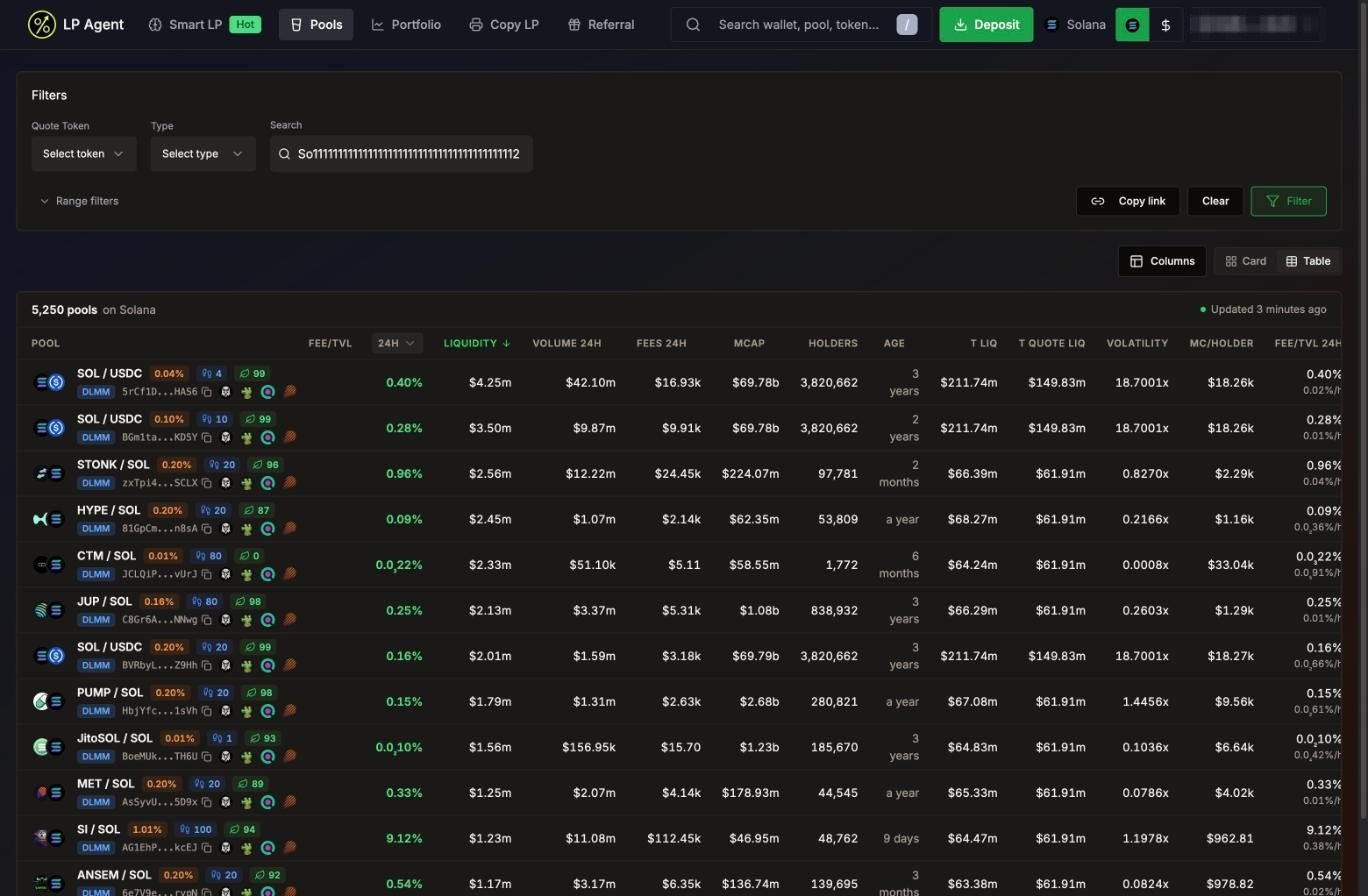 Pools on Solana, sorted by liquidity
## Views and sorting
* **Table** (default) or **Card** view, top right.
* The top bar shows how many pools match and when the data was last updated.
* Click a column header to sort, click again to flip the order. The default sort is **Fee/TVL**, highest first.
* **Columns** adds extra columns, such as total liquidity across the token's pools, volatility (24h volume / liquidity) and market cap per holder on Solana.
| Column | Meaning |
| - | - |
| **Pool** | Pair, swap fee, protocol (DLMM, DAMM V2, Uniswap V3, Uniswap V4), bin step on DLMM, organic score on Solana, address and quick links |
| **Fee/TVL** | Fees earned relative to liquidity over the window (24h, 6h, 1h or 5m on Solana; 24h on Robinhood Chain) |
| **Liquidity** | Total value locked in the pool. On Robinhood Chain it also shows the token split and an estimated **APR** |
| **Volume** / **Fees** | Trading volume and fees over the window |
| **MCAP** | Market cap of the main token |
| **Holders** | Holder count (Solana) |
| **Age** | How long the pool has existed |
| **Category** | **Stock** for tokenized stocks (Robinhood Chain) |
A high Fee/TVL on a tiny pool can disappear fast. Check liquidity, volume and age together before you zap in.
## Filters
| Filter | Solana | Robinhood Chain |
| - | - | - |
| **Quote Token** | SOL & USDC, SOL, USDC | WETH & USDG, WETH, USDG |
| **Type** / **Protocol** | All, DLMM, DAMM V2 | All, Uniswap V3, Uniswap V4 |
| **Category** | - | All, Stocks |
| **Search** | Paste a pool or token address | Paste a pool or token address |
| **Small pools** | - | **Show pools under \$5k** (off by default) |
| **Range filters** | Market cap, age, liquidity, 24h and 1h volume, 24h fees, bin step, base fee, organic score | Market cap, age, liquidity, volume, fees, base fee |
* **Filter** applies and saves your filters for this network. **Clear** resets them.
* **Copy link** copies a link with your current filters, so you can share a view.
* On Solana, new users start with a minimum liquidity, volume and organic score so the list is not flooded with dust pools.
* On Robinhood Chain, pools under $5k are hidden unless you turn on **Small pools**, search an address or set your own minimum liquidity. Pools showing $50k or more TVL with almost no volume are also left out of browsing.
## Tokenized stocks (Robinhood Chain)
Pools on Solana, sorted by liquidity
## Views and sorting
* **Table** (default) or **Card** view, top right.
* The top bar shows how many pools match and when the data was last updated.
* Click a column header to sort, click again to flip the order. The default sort is **Fee/TVL**, highest first.
* **Columns** adds extra columns, such as total liquidity across the token's pools, volatility (24h volume / liquidity) and market cap per holder on Solana.
| Column | Meaning |
| - | - |
| **Pool** | Pair, swap fee, protocol (DLMM, DAMM V2, Uniswap V3, Uniswap V4), bin step on DLMM, organic score on Solana, address and quick links |
| **Fee/TVL** | Fees earned relative to liquidity over the window (24h, 6h, 1h or 5m on Solana; 24h on Robinhood Chain) |
| **Liquidity** | Total value locked in the pool. On Robinhood Chain it also shows the token split and an estimated **APR** |
| **Volume** / **Fees** | Trading volume and fees over the window |
| **MCAP** | Market cap of the main token |
| **Holders** | Holder count (Solana) |
| **Age** | How long the pool has existed |
| **Category** | **Stock** for tokenized stocks (Robinhood Chain) |
A high Fee/TVL on a tiny pool can disappear fast. Check liquidity, volume and age together before you zap in.
## Filters
| Filter | Solana | Robinhood Chain |
| - | - | - |
| **Quote Token** | SOL & USDC, SOL, USDC | WETH & USDG, WETH, USDG |
| **Type** / **Protocol** | All, DLMM, DAMM V2 | All, Uniswap V3, Uniswap V4 |
| **Category** | - | All, Stocks |
| **Search** | Paste a pool or token address | Paste a pool or token address |
| **Small pools** | - | **Show pools under \$5k** (off by default) |
| **Range filters** | Market cap, age, liquidity, 24h and 1h volume, 24h fees, bin step, base fee, organic score | Market cap, age, liquidity, volume, fees, base fee |
* **Filter** applies and saves your filters for this network. **Clear** resets them.
* **Copy link** copies a link with your current filters, so you can share a view.
* On Solana, new users start with a minimum liquidity, volume and organic score so the list is not flooded with dust pools.
* On Robinhood Chain, pools under $5k are hidden unless you turn on **Small pools**, search an address or set your own minimum liquidity. Pools showing $50k or more TVL with almost no volume are also left out of browsing.
## Tokenized stocks (Robinhood Chain)
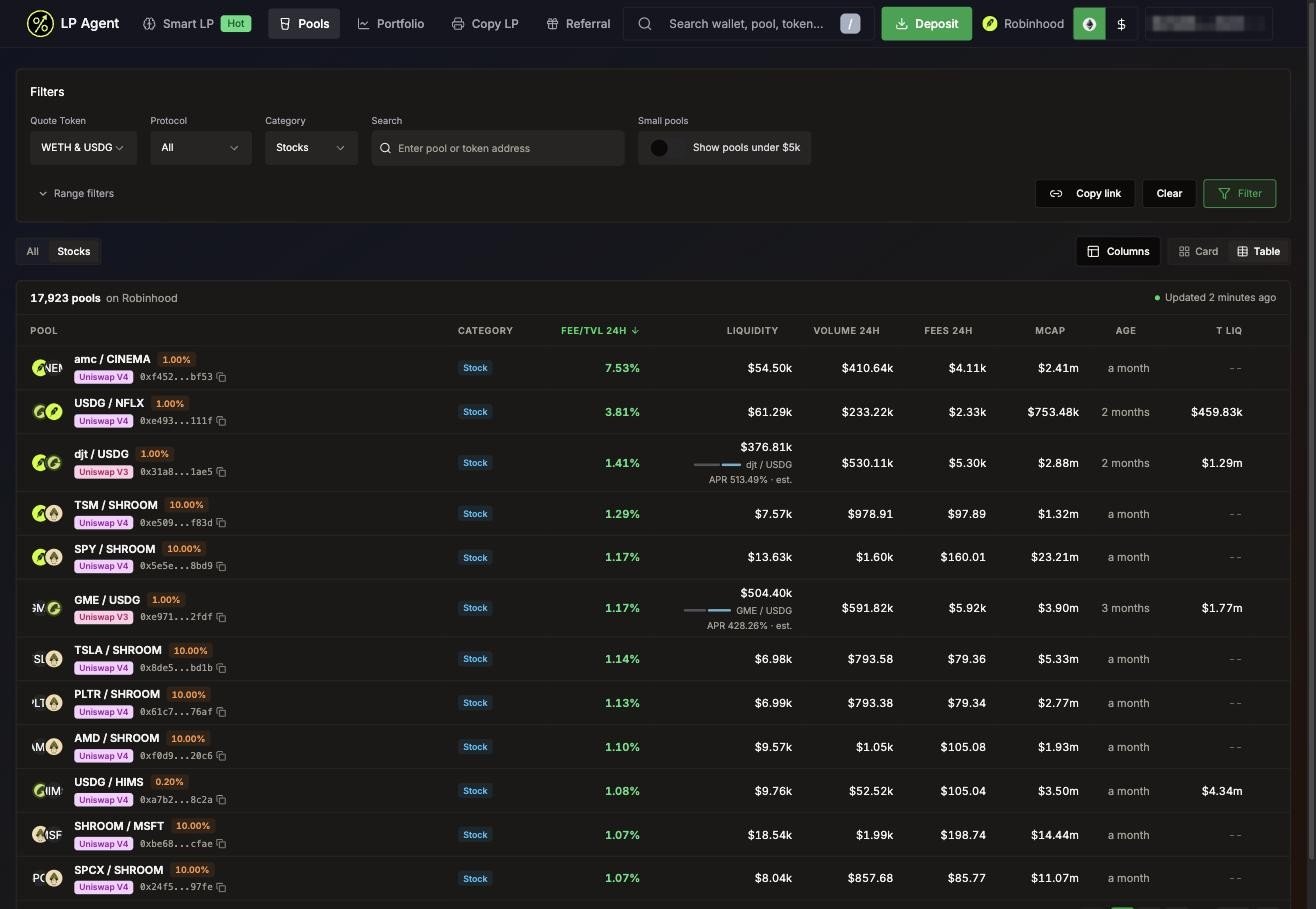 The Stocks filter on Robinhood Chain
Press **Stocks** above the table to see pools that hold a tokenized stock issued by Robinhood. They are matched by contract address against Robinhood's registry, not by ticker. A token that uses a stock's ticker but is a different contract is flagged **Fake ticker**.
## Search anything
The search box in the header (shortcut `/`) finds tokens, pools and wallets by address:
* **Token**: its market cap, volume and liquidity, and the top 10 pools with that token, ranked by 24h volume.
* **Pool**: opens the pool page.
* **Wallet**: win rate, total PnL, fees and EV, and opens the wallet's portfolio.
Your last 5 searches are kept under **Recent Searches**.
## The pool page
Click a pool to open it.
The Stocks filter on Robinhood Chain
Press **Stocks** above the table to see pools that hold a tokenized stock issued by Robinhood. They are matched by contract address against Robinhood's registry, not by ticker. A token that uses a stock's ticker but is a different contract is flagged **Fake ticker**.
## Search anything
The search box in the header (shortcut `/`) finds tokens, pools and wallets by address:
* **Token**: its market cap, volume and liquidity, and the top 10 pools with that token, ranked by 24h volume.
* **Pool**: opens the pool page.
* **Wallet**: win rate, total PnL, fees and EV, and opens the wallet's portfolio.
Your last 5 searches are kept under **Recent Searches**.
## The pool page
Click a pool to open it.
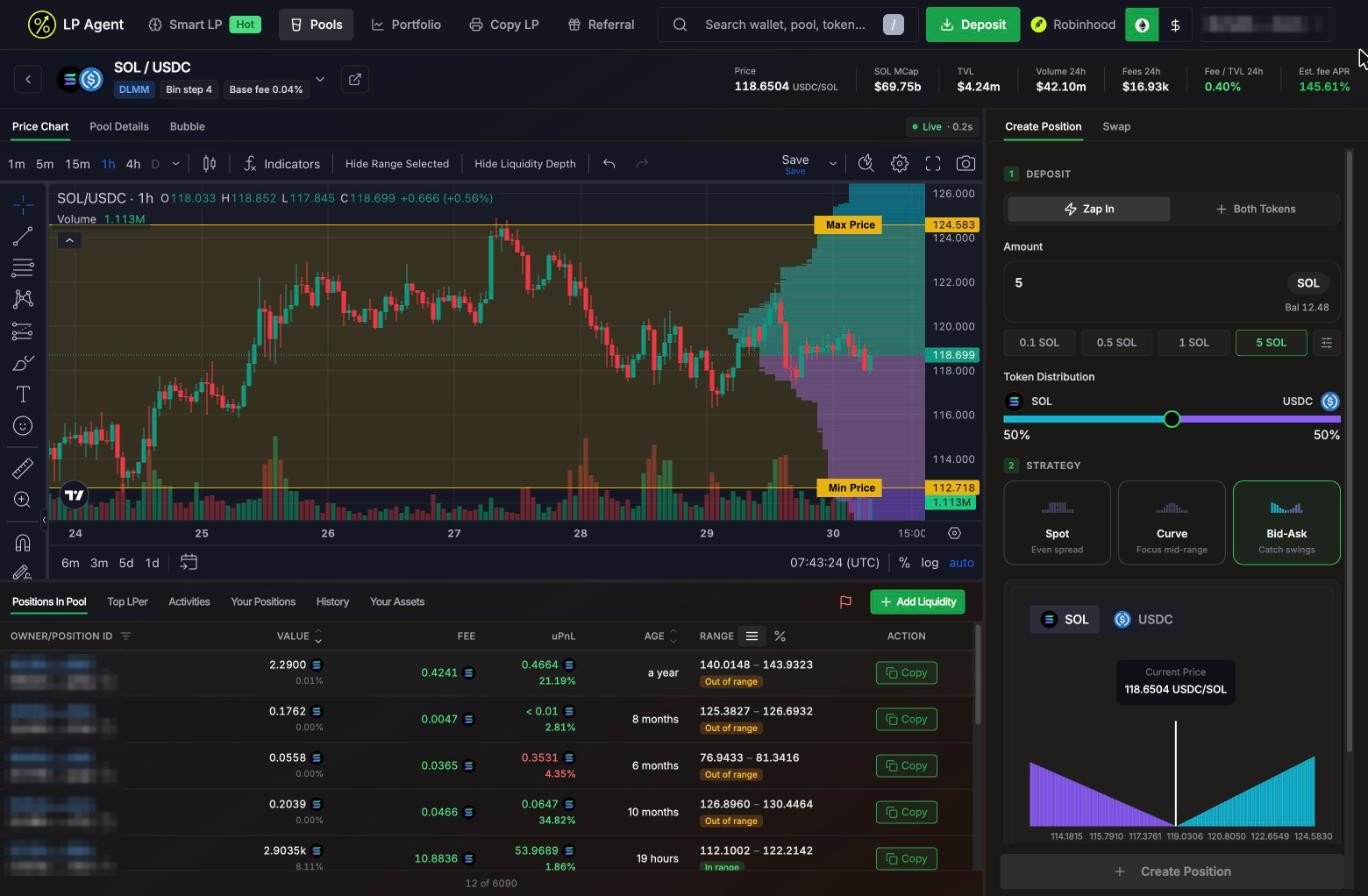 A Meteora DLMM pool: price chart with your range and liquidity depth, positions in the pool, and the Create Position panel
**Header:** pair, protocol, bin step and base fee, and live stats: price, market cap, TVL, 24h volume, 24h fees, Fee/TVL and estimated fee APR. Click the pair to switch to another pool of the same token. The link icon opens the pool on Meteora or Uniswap, GMGN, DexScreener or the block explorer.
**Tabs at the top:**
* **Price Chart**: candles from 1 minute to 1 day. On DLMM pools the liquidity depth is drawn next to the price. Drag the **Min Price** and **Max Price** lines to set your range by eye.
* **Pool Details**: pool address, fees, token amounts and share of TVL. On Solana, fee history and the liquidity distribution per bin.
* **Bubble** (Solana): a holder bubble map of the main token.
A **Live** badge on Solana pools shows the data is streaming.
**Tabs at the bottom:**
| Tab | What it shows |
| - | - |
| **Positions In Pool** | Every open position: owner, value, fees, uPnL, age and range. Hover an owner to see their track record. Press **Copy** to open the same range and strategy yourself. |
| **Top LPer** | The wallets that made the most in this pool: total PnL, fees, positions, average age and win rate. |
| **Activities** | A live feed of adds, removes and claims (Solana). |
| **Your Positions** / **History** | Your open and closed positions in this pool. |
| **Your Assets** | Tokens in your wallet, with a swap shortcut on Solana. |
The flag icon lets you report a pool.
A Meteora DLMM pool: price chart with your range and liquidity depth, positions in the pool, and the Create Position panel
**Header:** pair, protocol, bin step and base fee, and live stats: price, market cap, TVL, 24h volume, 24h fees, Fee/TVL and estimated fee APR. Click the pair to switch to another pool of the same token. The link icon opens the pool on Meteora or Uniswap, GMGN, DexScreener or the block explorer.
**Tabs at the top:**
* **Price Chart**: candles from 1 minute to 1 day. On DLMM pools the liquidity depth is drawn next to the price. Drag the **Min Price** and **Max Price** lines to set your range by eye.
* **Pool Details**: pool address, fees, token amounts and share of TVL. On Solana, fee history and the liquidity distribution per bin.
* **Bubble** (Solana): a holder bubble map of the main token.
A **Live** badge on Solana pools shows the data is streaming.
**Tabs at the bottom:**
| Tab | What it shows |
| - | - |
| **Positions In Pool** | Every open position: owner, value, fees, uPnL, age and range. Hover an owner to see their track record. Press **Copy** to open the same range and strategy yourself. |
| **Top LPer** | The wallets that made the most in this pool: total PnL, fees, positions, average age and win rate. |
| **Activities** | A live feed of adds, removes and claims (Solana). |
| **Your Positions** / **History** | Your open and closed positions in this pool. |
| **Your Assets** | Tokens in your wallet, with a swap shortcut on Solana. |
The flag icon lets you report a pool.
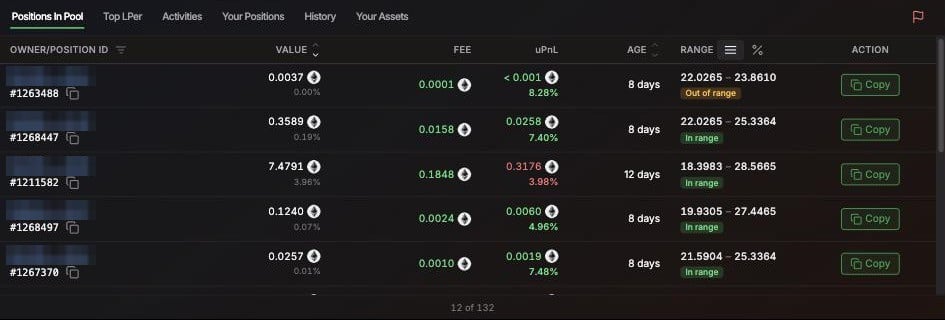 Positions In Pool on Robinhood Chain, with Copy on each row
The panel on the right is where you open a position. See [Create a Position](/features/create-position).
Positions In Pool on Robinhood Chain, with Copy on each row
The panel on the right is where you open a position. See [Create a Position](/features/create-position).