> ## Documentation Index
> Fetch the complete documentation index at: https://docs.lpagent.io/llms.txt
> Use this file to discover all available pages before exploring further.
# Discover
> Find the token worth an LP: tokens ranked live by volume, Fee/TVL, safety and smart LPs, with their pools one click away
Most LP losses start with a bad token, not a bad range. **Discover** is where you pick the token first: it ranks the tokens that have pools on Solana and Robinhood Chain by how their volume moves, how much their pools earn, how safe they look and whether smart LPs are in them. From a token you open its best pool, or create one if it has none.
Discover is the app's home page: [app.lpagent.io](https://app.lpagent.io/) and the logo open it, and it sits first in the menu.
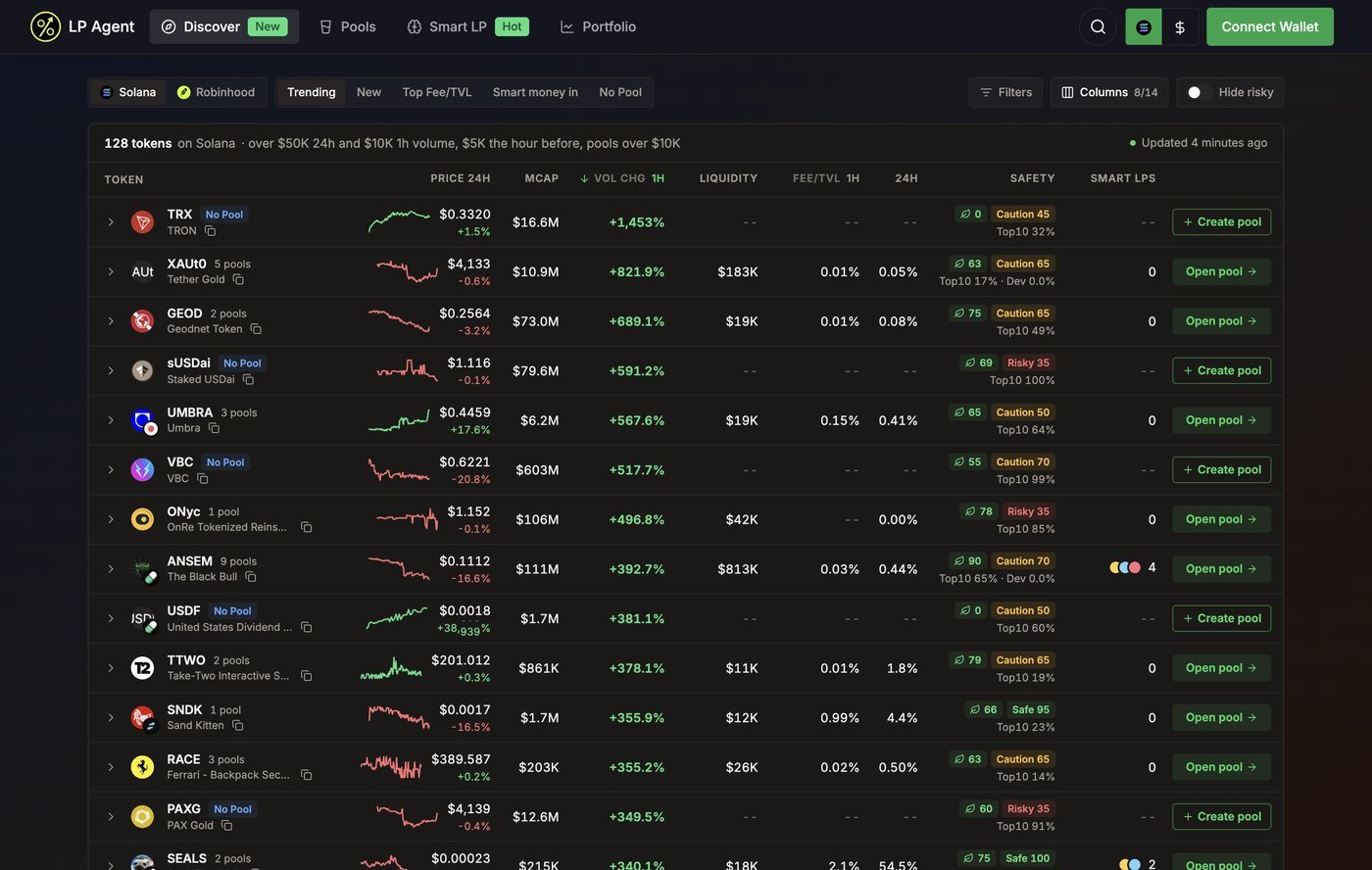 Discover on Solana, Trending preset (Example data)
## Pick a list
Pick the chain on the left (**Solana** or **Robinhood**), then a preset. Each preset is a sort plus a filter; you can change either afterwards.
| Preset | What it shows |
| - | - |
| **Trending** | Tokens picking up right now: sorted by **Vol chg 1h**, this hour's volume against the hour before. Only tokens over a volume floor are ranked, so a token that went from $40 to $900 does not top the list. The floor is written above the table. |
| **New** | Newest tokens first. A token in its first minute counts its age in seconds. |
| **Top Fee/TVL** | Tokens whose pools earn the most fees for their liquidity over the last hour. |
| **Smart money in** | Tokens with the most smart LPs holding a position in their pools. |
| **No Pool** | Tokens with trading volume but no pool worth listing yet, ready for you to [create one](/features/pools#create-a-pool). |
Discover remembers the chain and the list you picked last (preset or sort, **Hide risky** and your filters) and opens on them next time. A shared link opens the list it names instead. The table refreshes on its own; the line above the table says when it last did, and prices tick live in between.
## Read a row
| Column | Meaning |
| - | - |
| **Token** | Logo, ticker, name and how many pools it has (or **No Pool**). A small badge on the logo shows the launchpad it came from, such as pump.fun, LetsBonk, Bags, Jupiter Studio, MetaDAO, Raydium LaunchLab or StonkFun. |
| **Age** | How long ago the token was created |
| **Price 24h** | Price, its 24h change and a 24h sparkline |
| **MCap** / **Holders** | Market cap and holder count |
| **Vol 24h** / **Vol chg** | 24h volume, and how volume moved over 1h or 24h |
| **Liquidity** | Liquidity across the token's listed pools |
| **Fee/TVL** | Fees against liquidity across its pools, over 5m, 1h, 6h or 24h |
| **Safety** | The organic score and a safety score (see below), with top 10 and dev holdings underneath |
| **Smart LPs** | How many smart LPs hold an open position in the token's pools, and how that changed in the last hour (for example **+2 in 1h**) |
* Click a column header to sort, click again to flip the order.
* **Columns** turns columns on and off. When the window is too narrow for all of them, the least important ones make room; the menu marks them **No room**.
* On a phone each token is a card: the sorted metric sits on the right and a row of chips replaces the column headers for sorting.
Read a token the way a good LP is built: a safe token first, then healthy volume, then a good Fee/TVL. A big Fee/TVL on a token with a Risky score is usually the reason it is big.
## Safety and Hide risky
Every token gets a safety score out of 100: **Safe** (75 and above), **Caution** (40 to 74) or **Risky** (under 40). Hover the score to see what it is made of:
| Check | What it tells you |
| - | - |
| **Mint authority** | **Revoked** means nobody can mint more of the token |
| **Freeze authority** | **Revoked** means nobody can freeze your tokens |
| **Top 10 holders** / **Dev holdings** | How concentrated the supply is |
| **Organic score** | How much of the trading looks organic |
| **Holders** | Holder count |
| **Impersonation flag** | The ticker belongs to a registered token but this is a different contract. The row says **Fake ticker**. |
Turn on **Hide risky** to drop tokens scored under 40. Tokens with no audit data are hidden too, because they have no score to pass with. Robinhood Chain has no token audit source yet, so its tokens show the checks that are available.
## Filters
**Filters** narrows any list by token (address or ticker), whether the token has a pool, and ranges for market cap, liquidity, 24h volume, holders and age in hours. Amounts are in USD; you can type `500k`, `1.5m` or `2b`. Active filters show as chips above the table; remove one with its cross.
## Open a pool
Discover on Solana, Trending preset (Example data)
## Pick a list
Pick the chain on the left (**Solana** or **Robinhood**), then a preset. Each preset is a sort plus a filter; you can change either afterwards.
| Preset | What it shows |
| - | - |
| **Trending** | Tokens picking up right now: sorted by **Vol chg 1h**, this hour's volume against the hour before. Only tokens over a volume floor are ranked, so a token that went from $40 to $900 does not top the list. The floor is written above the table. |
| **New** | Newest tokens first. A token in its first minute counts its age in seconds. |
| **Top Fee/TVL** | Tokens whose pools earn the most fees for their liquidity over the last hour. |
| **Smart money in** | Tokens with the most smart LPs holding a position in their pools. |
| **No Pool** | Tokens with trading volume but no pool worth listing yet, ready for you to [create one](/features/pools#create-a-pool). |
Discover remembers the chain and the list you picked last (preset or sort, **Hide risky** and your filters) and opens on them next time. A shared link opens the list it names instead. The table refreshes on its own; the line above the table says when it last did, and prices tick live in between.
## Read a row
| Column | Meaning |
| - | - |
| **Token** | Logo, ticker, name and how many pools it has (or **No Pool**). A small badge on the logo shows the launchpad it came from, such as pump.fun, LetsBonk, Bags, Jupiter Studio, MetaDAO, Raydium LaunchLab or StonkFun. |
| **Age** | How long ago the token was created |
| **Price 24h** | Price, its 24h change and a 24h sparkline |
| **MCap** / **Holders** | Market cap and holder count |
| **Vol 24h** / **Vol chg** | 24h volume, and how volume moved over 1h or 24h |
| **Liquidity** | Liquidity across the token's listed pools |
| **Fee/TVL** | Fees against liquidity across its pools, over 5m, 1h, 6h or 24h |
| **Safety** | The organic score and a safety score (see below), with top 10 and dev holdings underneath |
| **Smart LPs** | How many smart LPs hold an open position in the token's pools, and how that changed in the last hour (for example **+2 in 1h**) |
* Click a column header to sort, click again to flip the order.
* **Columns** turns columns on and off. When the window is too narrow for all of them, the least important ones make room; the menu marks them **No room**.
* On a phone each token is a card: the sorted metric sits on the right and a row of chips replaces the column headers for sorting.
Read a token the way a good LP is built: a safe token first, then healthy volume, then a good Fee/TVL. A big Fee/TVL on a token with a Risky score is usually the reason it is big.
## Safety and Hide risky
Every token gets a safety score out of 100: **Safe** (75 and above), **Caution** (40 to 74) or **Risky** (under 40). Hover the score to see what it is made of:
| Check | What it tells you |
| - | - |
| **Mint authority** | **Revoked** means nobody can mint more of the token |
| **Freeze authority** | **Revoked** means nobody can freeze your tokens |
| **Top 10 holders** / **Dev holdings** | How concentrated the supply is |
| **Organic score** | How much of the trading looks organic |
| **Holders** | Holder count |
| **Impersonation flag** | The ticker belongs to a registered token but this is a different contract. The row says **Fake ticker**. |
Turn on **Hide risky** to drop tokens scored under 40. Tokens with no audit data are hidden too, because they have no score to pass with. Robinhood Chain has no token audit source yet, so its tokens show the checks that are available.
## Filters
**Filters** narrows any list by token (address or ticker), whether the token has a pool, and ranges for market cap, liquidity, 24h volume, holders and age in hours. Amounts are in USD; you can type `500k`, `1.5m` or `2b`. Active filters show as chips above the table; remove one with its cross.
## Open a pool
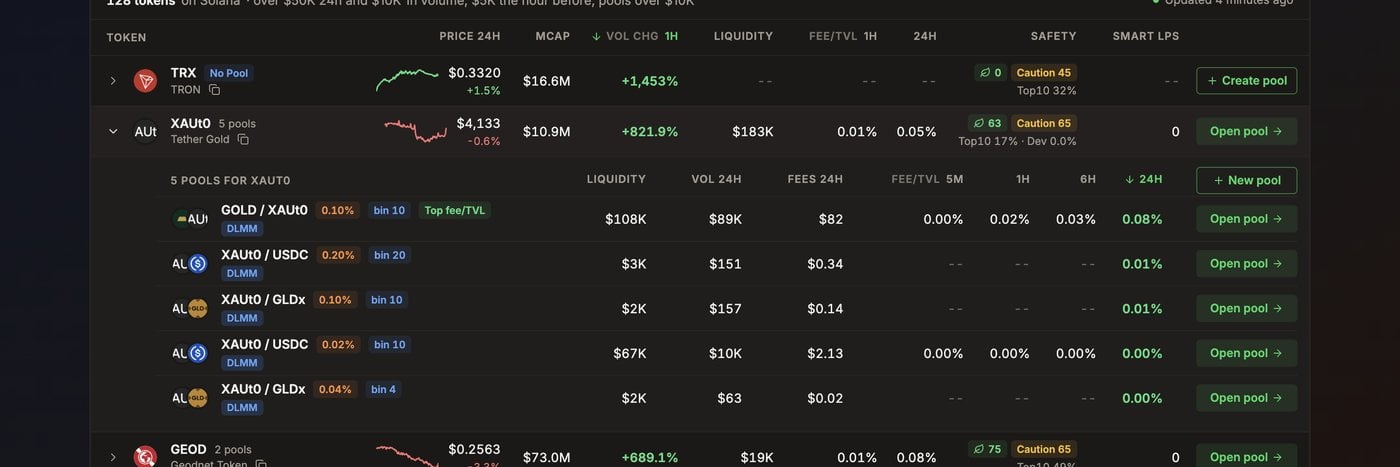 A token unfolded to its pools, the top Fee/TVL pool first (Example data)
* **Open pool** goes straight to the token's top pool, where you [add liquidity](/features/create-position).
* Click the row (or its arrow) to unfold every pool of the token with its liquidity, 24h volume, fees and Fee/TVL over 5m, 1h, 6h and 24h. The best one carries a **Top fee/TVL** chip. Each pool has its own **Open pool**.
* **New pool** in the unfolded list, or **Create pool** on a token with no pool, opens the create dialog. See [Create a pool](/features/pools#create-a-pool).
Discover has no deposit step of its own: adding liquidity always happens on the pool page, so the same protections apply as anywhere else in the app.
## Share a list
A Discover link carries the chain, preset, sort and filters, so the person you send it to opens the same list.
## Related
* [Pools](/features/pools): every pool LP Agent tracks, with pool-level filters
* [Add liquidity](/features/create-position): the pool page's deposit panel
* [Smart LP](/features/smart-lp): the wallets behind the **Smart LPs** column
This documentation is built and hosted on [Mintlify](https://mintlify.com), a developer documentation platform.
A token unfolded to its pools, the top Fee/TVL pool first (Example data)
* **Open pool** goes straight to the token's top pool, where you [add liquidity](/features/create-position).
* Click the row (or its arrow) to unfold every pool of the token with its liquidity, 24h volume, fees and Fee/TVL over 5m, 1h, 6h and 24h. The best one carries a **Top fee/TVL** chip. Each pool has its own **Open pool**.
* **New pool** in the unfolded list, or **Create pool** on a token with no pool, opens the create dialog. See [Create a pool](/features/pools#create-a-pool).
Discover has no deposit step of its own: adding liquidity always happens on the pool page, so the same protections apply as anywhere else in the app.
## Share a list
A Discover link carries the chain, preset, sort and filters, so the person you send it to opens the same list.
## Related
* [Pools](/features/pools): every pool LP Agent tracks, with pool-level filters
* [Add liquidity](/features/create-position): the pool page's deposit panel
* [Smart LP](/features/smart-lp): the wallets behind the **Smart LPs** column
This documentation is built and hosted on [Mintlify](https://mintlify.com), a developer documentation platform.