> ## Documentation Index
> Fetch the complete documentation index at: https://docs.lpagent.io/llms.txt
> Use this file to discover all available pages before exploring further.
# Copy Settings
> Every option in the copy dialog, step by step
The copy dialog opens when you press **Copy LP** on a wallet's portfolio, or click a wallet under **Copy LP > Copied Wallets**. It has five steps. The left column shows a one-line summary of each step, so you can jump straight to the one you want.
* **Copying on / off** (top right): turn it off to keep following the wallet without copying anything. It moves to **Paused** in your list.
* **Copy** (new) or **Update Copy** (existing) saves every step at once. The footer counts your unsaved changes.
* The box under the steps shows the net worth we suggest for copying: **5 SOL** on Solana, **0.08 ETH** on Robinhood Chain. It is advice only; nothing is blocked.
## Step 1: Sizing
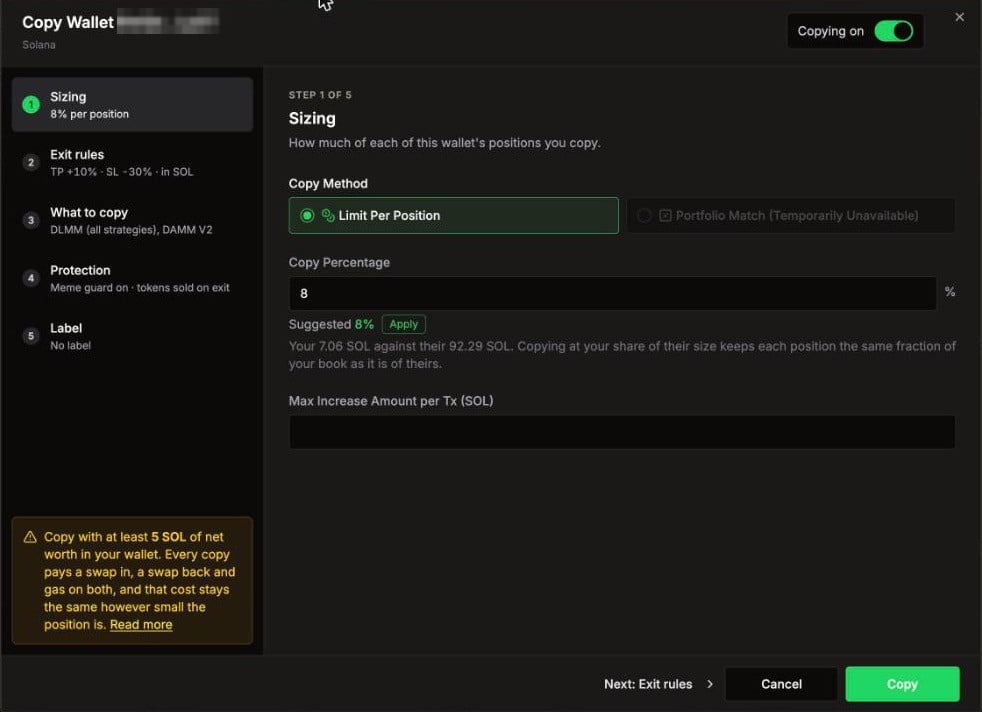 Sizing: copy percentage, the suggested value and the max per transaction
| Option | What it does |
| - | - |
| **Copy Method** | **Limit Per Position**: each leader position is scaled by your percentage. |
| **Copy Percentage** | Whole number from 1% to 10000%. Above 100% makes your positions bigger than the leader's. |
| **Suggested** + **Apply** | Your net worth divided by the leader's. Copying at this share keeps each position the same fraction of your wallet as it is of theirs. |
| **Max Increase Amount per Tx** | Optional cap on each copied open and each copied add, in your TP/SL currency. Leave it empty for no cap. |
| **Funding currency** (Robinhood Chain) | Shows whether new copies use ETH or USDG, and your ETH for gas. Change it in Settings. |
You need a Copy Percentage, a Max, or both.
A Max of **0** copies nothing. To copy without a cap, leave the field empty.
**Fast wallets:** when the leader holds positions for less than 18 minutes on average (Solana) or 1 hour (Robinhood Chain), the dialog shows a **High-frequency** warning. You pay a swap in, a swap back and network fees on every flip, whether or not the trade worked.
## Step 2: Exit rules
When your copy closes on its own, before the leader does.
| Option | What it does |
| - | - |
| **TP/SL Currency** | Measure profit and loss in SOL/ETH or in USD. Also sets the unit of the Max in step 1. |
| **Take Profit** | Close the copy when it is up this many percent. |
| **Stop Loss** | Close the copy when it is down this many percent. |
Untick a box to turn that side off. A new copy starts with your account's default TP/SL (10% / 10% for new accounts).
The TP/SL is saved on each copied position when it opens. If you later pause or stop copying, open copies keep their TP/SL. The **Auto TP/SL** switch in Settings does not apply to copies; they always use these exit rules.
## Step 3: What to copy
Pick which of the leader's pool types you follow. Untick a type to skip it.
Sizing: copy percentage, the suggested value and the max per transaction
| Option | What it does |
| - | - |
| **Copy Method** | **Limit Per Position**: each leader position is scaled by your percentage. |
| **Copy Percentage** | Whole number from 1% to 10000%. Above 100% makes your positions bigger than the leader's. |
| **Suggested** + **Apply** | Your net worth divided by the leader's. Copying at this share keeps each position the same fraction of your wallet as it is of theirs. |
| **Max Increase Amount per Tx** | Optional cap on each copied open and each copied add, in your TP/SL currency. Leave it empty for no cap. |
| **Funding currency** (Robinhood Chain) | Shows whether new copies use ETH or USDG, and your ETH for gas. Change it in Settings. |
You need a Copy Percentage, a Max, or both.
A Max of **0** copies nothing. To copy without a cap, leave the field empty.
**Fast wallets:** when the leader holds positions for less than 18 minutes on average (Solana) or 1 hour (Robinhood Chain), the dialog shows a **High-frequency** warning. You pay a swap in, a swap back and network fees on every flip, whether or not the trade worked.
## Step 2: Exit rules
When your copy closes on its own, before the leader does.
| Option | What it does |
| - | - |
| **TP/SL Currency** | Measure profit and loss in SOL/ETH or in USD. Also sets the unit of the Max in step 1. |
| **Take Profit** | Close the copy when it is up this many percent. |
| **Stop Loss** | Close the copy when it is down this many percent. |
Untick a box to turn that side off. A new copy starts with your account's default TP/SL (10% / 10% for new accounts).
The TP/SL is saved on each copied position when it opens. If you later pause or stop copying, open copies keep their TP/SL. The **Auto TP/SL** switch in Settings does not apply to copies; they always use these exit rules.
## Step 3: What to copy
Pick which of the leader's pool types you follow. Untick a type to skip it.
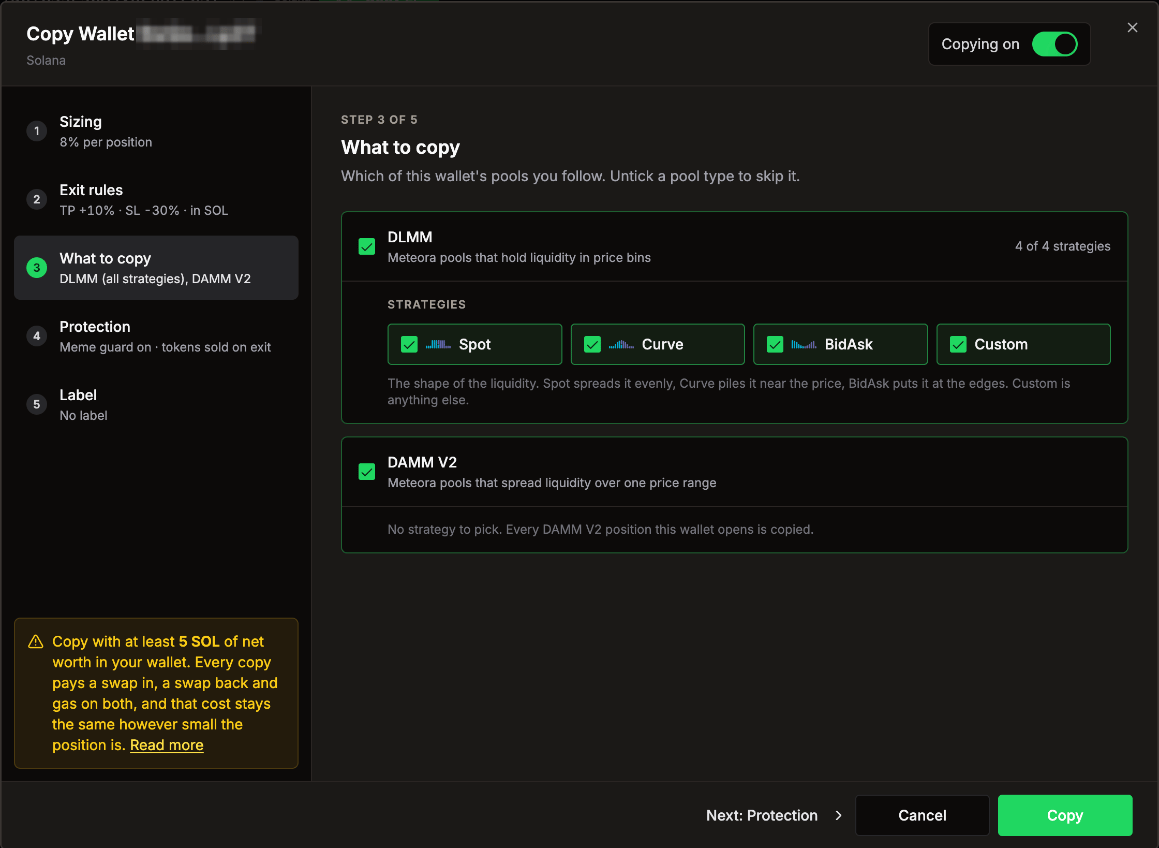 DLMM with its strategies, and DAMM V2
* **DLMM**: Meteora pools that hold liquidity in price bins. Pick which **Strategies** to copy: **Spot** (even spread), **Curve** (piled near the price), **BidAsk** (at the edges) and **Custom** (anything else). A leader position with a strategy you unticked is skipped.
* **DAMM V2**: Meteora pools that spread liquidity over one price range. Every DAMM V2 position is copied.
DLMM with its strategies, and DAMM V2
* **DLMM**: Meteora pools that hold liquidity in price bins. Pick which **Strategies** to copy: **Spot** (even spread), **Curve** (piled near the price), **BidAsk** (at the edges) and **Custom** (anything else). A leader position with a strategy you unticked is skipped.
* **DAMM V2**: Meteora pools that spread liquidity over one price range. Every DAMM V2 position is copied.
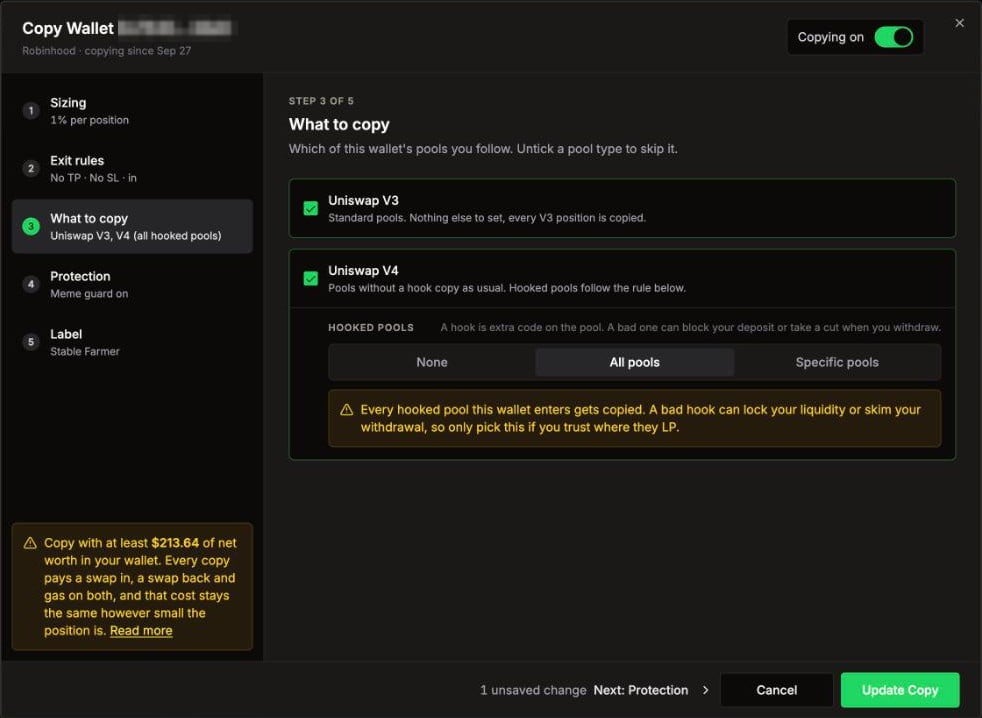 Uniswap V3, Uniswap V4 and the hooked pools rule
* **Uniswap V3**: standard pools. Every V3 position is copied.
* **Uniswap V4**: pools without a hook copy as usual. **Hooked pools** follow the rule you pick:
* **None** (default): copies into hooked pools are skipped.
* **All pools**: every hooked pool is copied. A bad hook can lock your liquidity or take a cut when you withdraw, so only pick this if you trust where the leader LPs.
* **Specific pools**: only the pools you add. Search a token or paste a pool ID (0x plus 64 characters). The dialog lists the hooked pools this leader uses. Pools whose hook never touches liquidity show **No LP hook, copies anyway**. Up to 50 pools.
The hook rule only applies to opens and adds. Exits are never blocked.
## Step 4: Protection
Guards that change what LP Agent does with this wallet's trades.
Uniswap V3, Uniswap V4 and the hooked pools rule
* **Uniswap V3**: standard pools. Every V3 position is copied.
* **Uniswap V4**: pools without a hook copy as usual. **Hooked pools** follow the rule you pick:
* **None** (default): copies into hooked pools are skipped.
* **All pools**: every hooked pool is copied. A bad hook can lock your liquidity or take a cut when you withdraw, so only pick this if you trust where the leader LPs.
* **Specific pools**: only the pools you add. Search a token or paste a pool ID (0x plus 64 characters). The dialog lists the hooked pools this leader uses. Pools whose hook never touches liquidity show **No LP hook, copies anyway**. Up to 50 pools.
The hook rule only applies to opens and adds. Exits are never blocked.
## Step 4: Protection
Guards that change what LP Agent does with this wallet's trades.
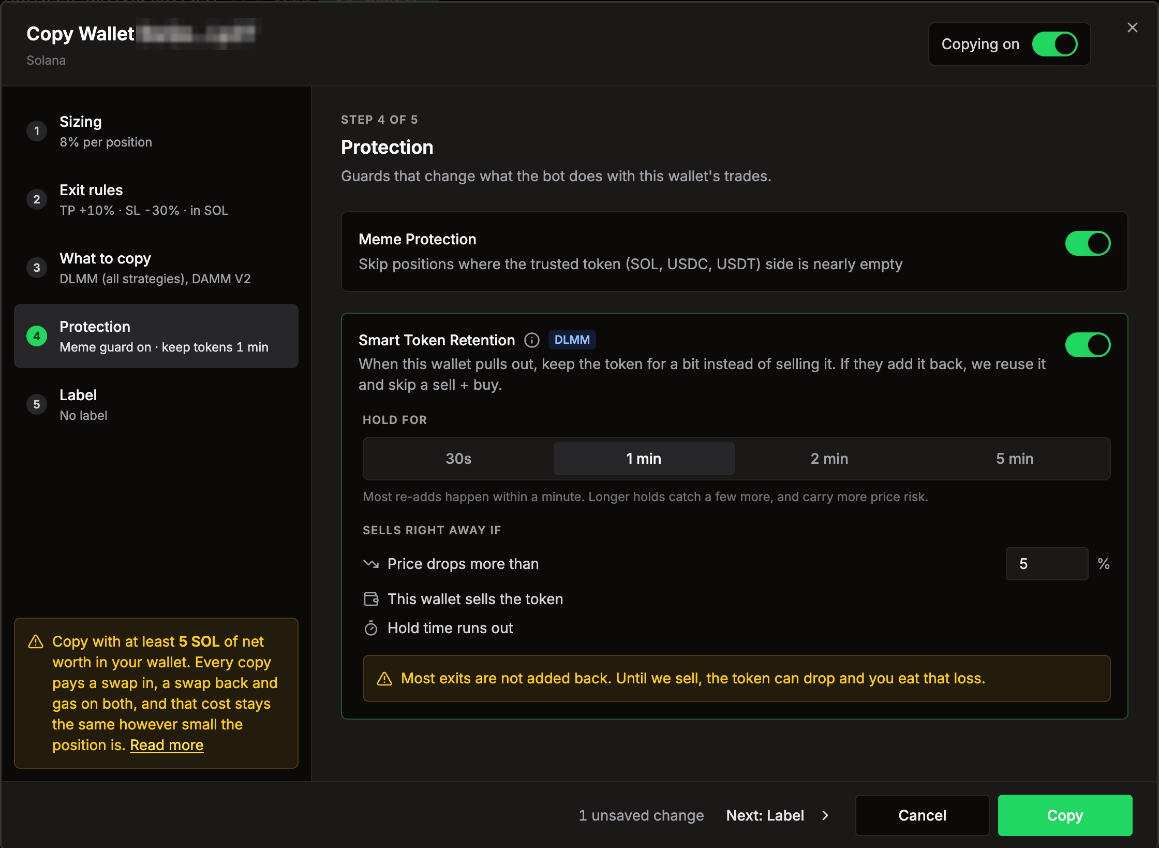 Meme Protection and Smart Token Retention (Solana)
### Meme Protection
On by default, both networks. Skips a copy when the trusted side of the pool (SOL, USDC, USDT, or ETH, WETH, USDG) would be nearly empty, that is, when more than 95% of your copy would sit in the other token. Copy Logs shows these as **Meme protection**.
### Smart Token Retention (Solana, DLMM)
Off by default. Leaders often pull a position and add the same token back a minute later. Normally your copy sells the token on exit and buys it again on the re-add. With Smart Token Retention on, your copy **keeps the token for a short time** instead, and reuses it if the same leader adds it back. That skips a sell and a buy.
| Option | Choices |
| - | - |
| **Hold for** | 30s, **1 min** (default), 2 min, 5 min |
| **Sells right away if** | **Price drops more than** 5% (0.5% to 50%), **This wallet sells the token**, or **Hold time runs out** |
The card shows how often this wallet added the same token back within 1 and 5 minutes over the last 7 days.
Most exits are not added back. Until the token is sold, its price can drop and you take that loss. Turning retention off, pausing or stopping the copy sells any kept tokens.
Kept tokens show as **Holding** in Copy Logs, with a countdown and a **Sell now** button.
## Step 5: Label
A name for this wallet in your lists and in Copy Logs.
## Account-wide settings that also apply to copies
These live in [Settings](/features/settings), not in the copy dialog:
* **Settings > Security**: minimum market cap, minimum 24h volume, minimum holders, Jupiter organic score (Solana) and your token **Blacklist**. A token that fails any of them is skipped.
* **Settings > Swap > Slippage**: used for every swap your agent makes, including copies and swap backs.
* **Settings > General > Base Token** and **Keep ETH** (Robinhood Chain): fund copies in ETH or USDG, and keep ETH topped up for gas.
On Robinhood Chain, an automatic copy is skipped as **Too small for gas** when the gas to open and close it would be more than 3% of the copy's size.
Meme Protection and Smart Token Retention (Solana)
### Meme Protection
On by default, both networks. Skips a copy when the trusted side of the pool (SOL, USDC, USDT, or ETH, WETH, USDG) would be nearly empty, that is, when more than 95% of your copy would sit in the other token. Copy Logs shows these as **Meme protection**.
### Smart Token Retention (Solana, DLMM)
Off by default. Leaders often pull a position and add the same token back a minute later. Normally your copy sells the token on exit and buys it again on the re-add. With Smart Token Retention on, your copy **keeps the token for a short time** instead, and reuses it if the same leader adds it back. That skips a sell and a buy.
| Option | Choices |
| - | - |
| **Hold for** | 30s, **1 min** (default), 2 min, 5 min |
| **Sells right away if** | **Price drops more than** 5% (0.5% to 50%), **This wallet sells the token**, or **Hold time runs out** |
The card shows how often this wallet added the same token back within 1 and 5 minutes over the last 7 days.
Most exits are not added back. Until the token is sold, its price can drop and you take that loss. Turning retention off, pausing or stopping the copy sells any kept tokens.
Kept tokens show as **Holding** in Copy Logs, with a countdown and a **Sell now** button.
## Step 5: Label
A name for this wallet in your lists and in Copy Logs.
## Account-wide settings that also apply to copies
These live in [Settings](/features/settings), not in the copy dialog:
* **Settings > Security**: minimum market cap, minimum 24h volume, minimum holders, Jupiter organic score (Solana) and your token **Blacklist**. A token that fails any of them is skipped.
* **Settings > Swap > Slippage**: used for every swap your agent makes, including copies and swap backs.
* **Settings > General > Base Token** and **Keep ETH** (Robinhood Chain): fund copies in ETH or USDG, and keep ETH topped up for gas.
On Robinhood Chain, an automatic copy is skipped as **Too small for gas** when the gas to open and close it would be more than 3% of the copy's size.