> ## Documentation Index
> Fetch the complete documentation index at: https://docs.lpagent.io/llms.txt
> Use this file to discover all available pages before exploring further.
# Managing Your Copies
> Copied Wallets, Analysis, Copy Logs and the protections that pause copying
The **Copy LP** page in the top menu has three tabs: **Copied Wallets**, **Analysis** and **Copy Logs**.
## Copied Wallets
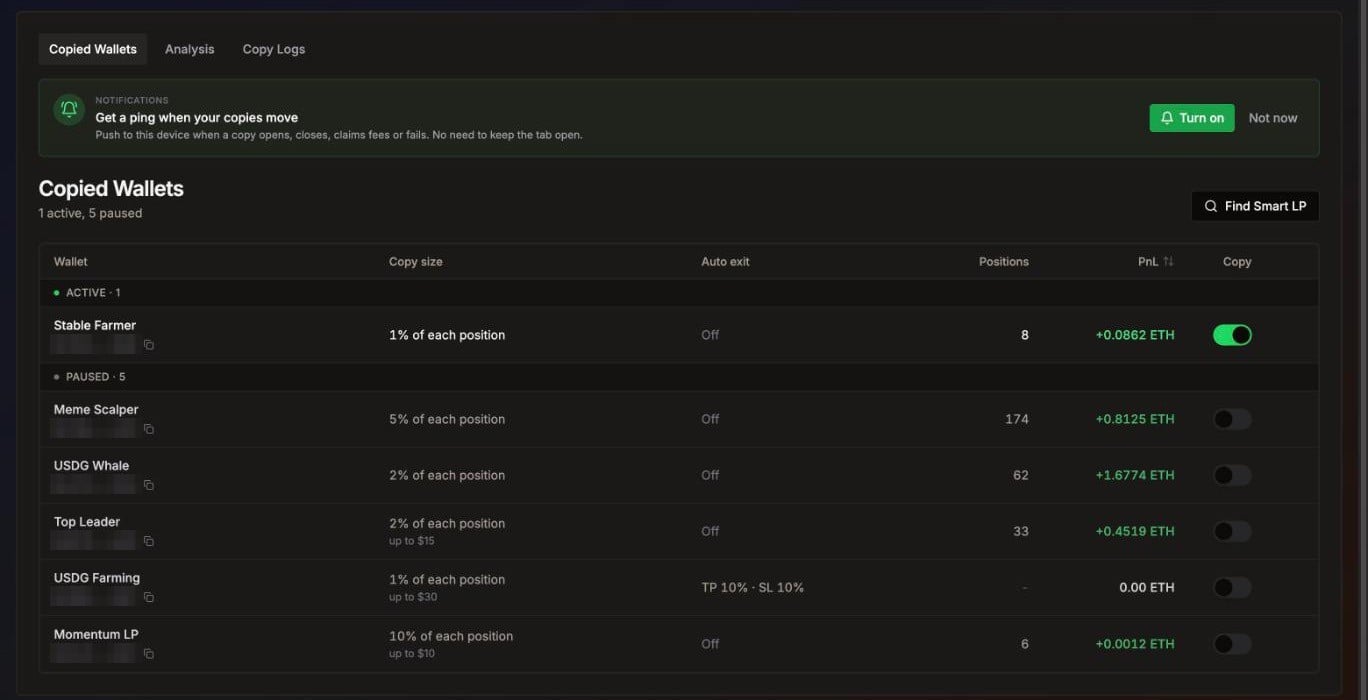 Your copied wallets, grouped into Active and Paused. Example data.
Each row is a wallet you follow:
| Column | What it shows |
| - | - |
| **Wallet** | Your label and the wallet address. Click to open the copy settings. |
| **Copy size** | For example "10% of each position, up to 2 SOL", plus any pool type filters. |
| **Auto exit** | Your take profit and stop loss, or Off. |
| **Positions** | How many copies were opened from this wallet. |
| **PnL** | Your profit from this wallet's copies. |
| **Copy** | Switch to pause or resume copying. |
The row menu has **Edit settings**, **View portfolio**, **Copy address** and **Stop copying**. **Find Smart LP** takes you to the leaderboard.
* **Pause** (switch off): nothing from this wallet is copied, **including closes**. Your open copies stay open with their own take profit and stop loss.
* **Stop copying**: removes the wallet from your list. Positions you already copied stay open until you close them.
## Analysis
Your copied wallets, grouped into Active and Paused. Example data.
Each row is a wallet you follow:
| Column | What it shows |
| - | - |
| **Wallet** | Your label and the wallet address. Click to open the copy settings. |
| **Copy size** | For example "10% of each position, up to 2 SOL", plus any pool type filters. |
| **Auto exit** | Your take profit and stop loss, or Off. |
| **Positions** | How many copies were opened from this wallet. |
| **PnL** | Your profit from this wallet's copies. |
| **Copy** | Switch to pause or resume copying. |
The row menu has **Edit settings**, **View portfolio**, **Copy address** and **Stop copying**. **Find Smart LP** takes you to the leaderboard.
* **Pause** (switch off): nothing from this wallet is copied, **including closes**. Your open copies stay open with their own take profit and stop loss.
* **Stop copying**: removes the wallet from your list. Positions you already copied stay open until you close them.
## Analysis
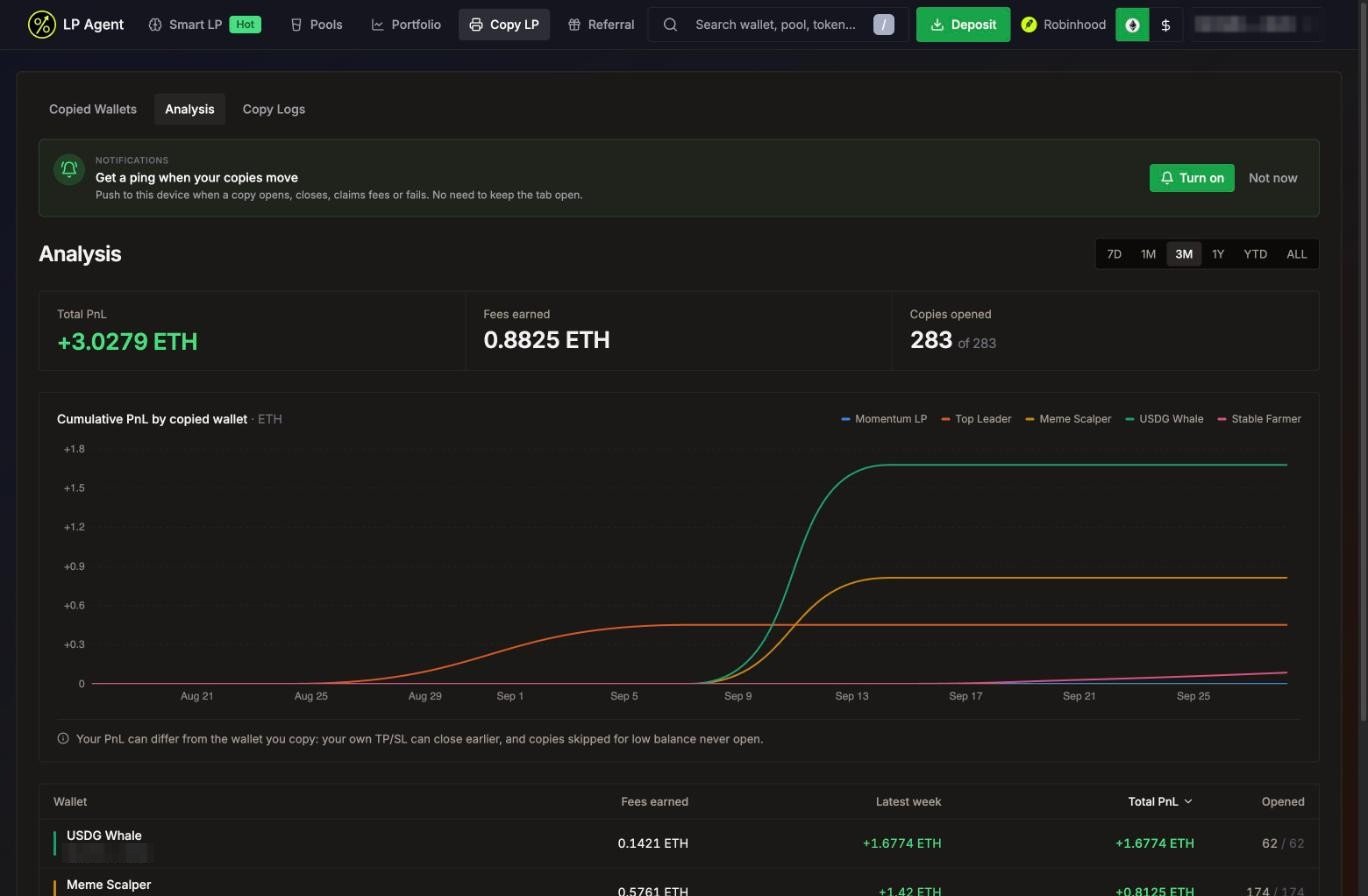 Total PnL, fees earned and cumulative PnL per copied wallet. Example data.
* Pick a range: **7D**, **1M** (default), **3M**, **1Y**, **YTD** or **ALL**.
* The top cards show **Total PnL**, **Fees earned** and **Copies opened**.
* The chart shows cumulative PnL for each copied wallet. Hover a name in the legend to highlight its line.
* The table below lists each wallet's fees, latest period PnL, total PnL and copies opened.
Your PnL can differ from the wallet you copy: your own TP/SL can close earlier, and copies skipped for low balance never open.
## Copy Logs
Copy Logs is the full record of every copy: opened, closed, and the ones that did not happen, with the reason.
Total PnL, fees earned and cumulative PnL per copied wallet. Example data.
* Pick a range: **7D**, **1M** (default), **3M**, **1Y**, **YTD** or **ALL**.
* The top cards show **Total PnL**, **Fees earned** and **Copies opened**.
* The chart shows cumulative PnL for each copied wallet. Hover a name in the legend to highlight its line.
* The table below lists each wallet's fees, latest period PnL, total PnL and copies opened.
Your PnL can differ from the wallet you copy: your own TP/SL can close earlier, and copies skipped for low balance never open.
## Copy Logs
Copy Logs is the full record of every copy: opened, closed, and the ones that did not happen, with the reason.
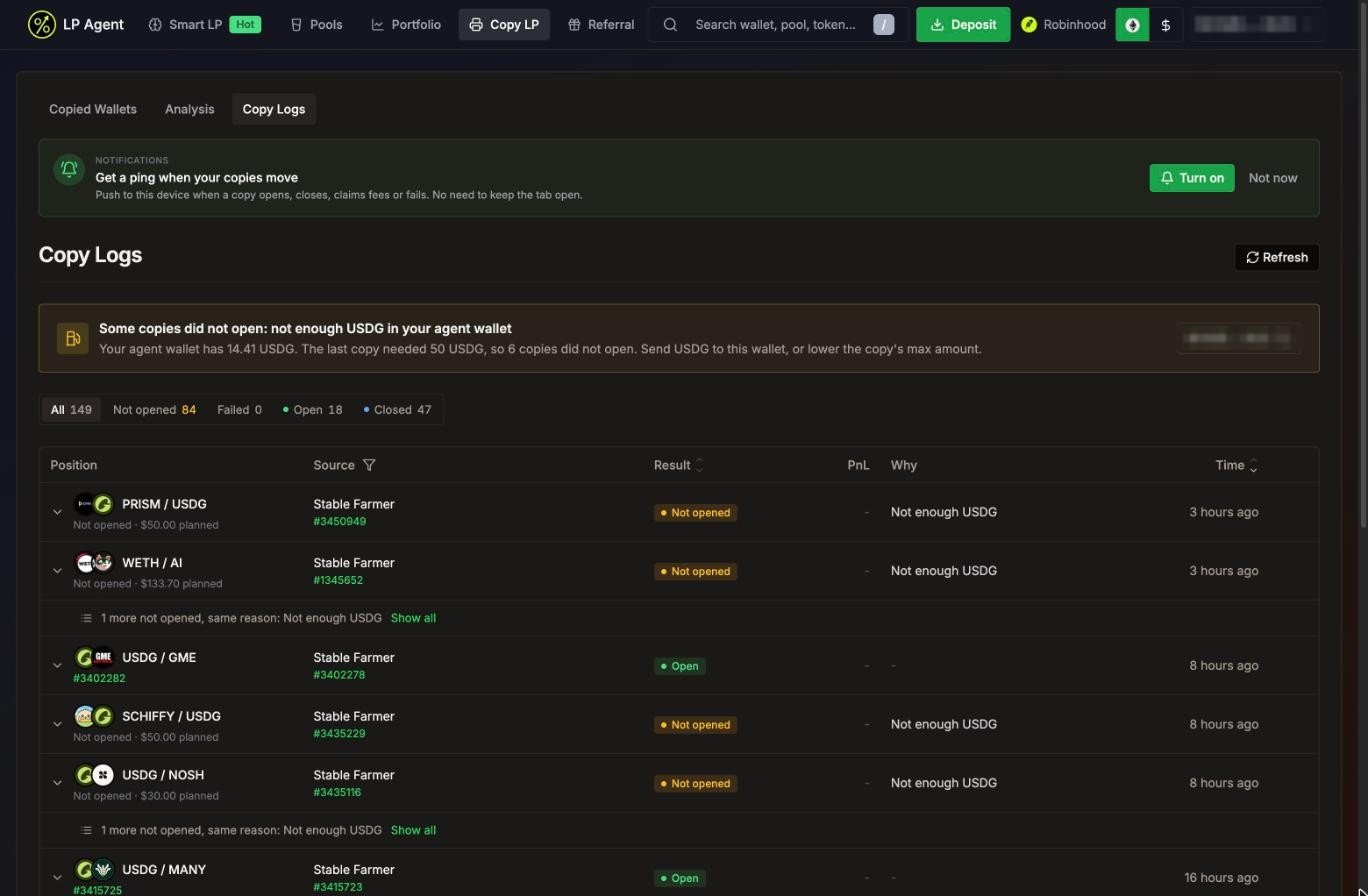 Copy Logs with a funding warning at the top and the reason for each copy that did not open
### Filters and columns
* Tabs: **All**, **Not opened**, **Failed**, **Open** and **Closed**, with counts.
* Filter by source wallet in the **Source** column header.
* Columns: **Position**, **Source** (leader and its position), **Result**, **PnL**, **Why** and **Time**.
Result labels:
| Result | Meaning |
| - | - |
| **Open** | Your copy is open. |
| **Closed** | Your copy is closed. |
| **Holding** | Closed, but Smart Token Retention is keeping the token for a moment. Shows a countdown and **Sell now**. |
| **Not opened** | The copy did not open, for example because of low balance. |
| **Skipped** | Your settings turned the copy down, for example a token filter or Meme Protection. |
| **Failed** | The copy was tried and failed. |
| **Pending** | In progress. |
For closed copies, **PnL** shows the final result checked against on-chain transactions (marked **True PnL**). While that check runs it shows **Tallying**.
Repeated rows with the same reason are folded into one line ("3 more not opened, same reason") with **Show all**.
### Fix it in one click
Most reasons come with a button that takes you straight to the fix:
| Reason | Button |
| - | - |
| Price moved | **Raise slippage** (opens Settings > Swap with a suggested value) |
| No ETH for gas / Not enough SOL or ETH | **Top up SOL/ETH** |
| Hooked pool not allowed | **Allow this pool** |
| Tokens left in wallet | **Swap to SOL/ETH** |
| Loss limit reached | **Edit limit** |
| Copy size is \$0 / Too small for gas | **Edit copy size** |
| Strategy not in your settings / Meme protection | **Edit copy settings** |
| Token blacklisted | **Edit blacklist** |
| Token failed safety check / Token below quality floor | **Edit filters** |
| Rug-risk leader / Leader's own token launch | None: skipped to keep you safe |
If your agent wallet is short on funds, a banner at the top of Copy Logs says how much you have, what the last copy needed, and how many copies did not open.
### Expand a row
Click a row to see its timeline (retries are folded, with "Fixed on retry" when a later try worked), transaction links, the funding numbers, and the result: invested, fees earned, how long it was held, and what closed it (take profit, stop loss or the leader's exit). From there you can **Share** a result.
### Report a copy
Something looks off? Press **Report this copy**, pick what looks wrong (didn't copy the leader, wrong amount, PnL looks off, tokens stuck, didn't close with the leader, something else), add details and press **Send report**. The copy's logs are attached for you.
## Protections that pause copying
### Fund protection (Solana)
Copy Logs with a funding warning at the top and the reason for each copy that did not open
### Filters and columns
* Tabs: **All**, **Not opened**, **Failed**, **Open** and **Closed**, with counts.
* Filter by source wallet in the **Source** column header.
* Columns: **Position**, **Source** (leader and its position), **Result**, **PnL**, **Why** and **Time**.
Result labels:
| Result | Meaning |
| - | - |
| **Open** | Your copy is open. |
| **Closed** | Your copy is closed. |
| **Holding** | Closed, but Smart Token Retention is keeping the token for a moment. Shows a countdown and **Sell now**. |
| **Not opened** | The copy did not open, for example because of low balance. |
| **Skipped** | Your settings turned the copy down, for example a token filter or Meme Protection. |
| **Failed** | The copy was tried and failed. |
| **Pending** | In progress. |
For closed copies, **PnL** shows the final result checked against on-chain transactions (marked **True PnL**). While that check runs it shows **Tallying**.
Repeated rows with the same reason are folded into one line ("3 more not opened, same reason") with **Show all**.
### Fix it in one click
Most reasons come with a button that takes you straight to the fix:
| Reason | Button |
| - | - |
| Price moved | **Raise slippage** (opens Settings > Swap with a suggested value) |
| No ETH for gas / Not enough SOL or ETH | **Top up SOL/ETH** |
| Hooked pool not allowed | **Allow this pool** |
| Tokens left in wallet | **Swap to SOL/ETH** |
| Loss limit reached | **Edit limit** |
| Copy size is \$0 / Too small for gas | **Edit copy size** |
| Strategy not in your settings / Meme protection | **Edit copy settings** |
| Token blacklisted | **Edit blacklist** |
| Token failed safety check / Token below quality floor | **Edit filters** |
| Rug-risk leader / Leader's own token launch | None: skipped to keep you safe |
If your agent wallet is short on funds, a banner at the top of Copy Logs says how much you have, what the last copy needed, and how many copies did not open.
### Expand a row
Click a row to see its timeline (retries are folded, with "Fixed on retry" when a later try worked), transaction links, the funding numbers, and the result: invested, fees earned, how long it was held, and what closed it (take profit, stop loss or the leader's exit). From there you can **Share** a result.
### Report a copy
Something looks off? Press **Report this copy**, pick what looks wrong (didn't copy the leader, wrong amount, PnL looks off, tokens stuck, didn't close with the leader, something else), add details and press **Send report**. The copy's logs are attached for you.
## Protections that pause copying
### Fund protection (Solana)
 Fund protection: copying pauses when copy losses hit your limit
Fund protection pauses new copies when your losses from copied positions reach a limit.
* It is on by default for Solana accounts, at **20% of net worth**.
* Press **Edit** to change the **Max loss from peak**. On save, the percentage becomes a fixed SOL amount from your net worth that day, and the count restarts.
* Losses count **closed copy positions only**, measured from their peak since the limit was set.
* When the limit is hit, the banner reads **Stopped**: new opens, adds, compounds and rebalances are blocked, while **exits still follow your leaders**. Copy Logs shows **Loss limit reached**.
* Press **Resume** to start again with the same limit and a fresh count. **Turn off** removes the limit.
### Automatic pause when the wallet runs dry
If copies keep failing because your agent wallet is out of funds or gas, LP Agent pauses copying on your wallets so they don't pile up failed attempts. An agent wallet that stays empty for a long time is paused the same way. The wallets move to **Paused**, and you get a push notification if you turned notifications on.
To resume: top up your agent wallet, then switch the wallets back on.
## Get notified
Turn on push notifications to hear about opens, adds, removes, closes, fee claims and failed or skipped copies. See [Notifications](/features/notifications).
Fund protection: copying pauses when copy losses hit your limit
Fund protection pauses new copies when your losses from copied positions reach a limit.
* It is on by default for Solana accounts, at **20% of net worth**.
* Press **Edit** to change the **Max loss from peak**. On save, the percentage becomes a fixed SOL amount from your net worth that day, and the count restarts.
* Losses count **closed copy positions only**, measured from their peak since the limit was set.
* When the limit is hit, the banner reads **Stopped**: new opens, adds, compounds and rebalances are blocked, while **exits still follow your leaders**. Copy Logs shows **Loss limit reached**.
* Press **Resume** to start again with the same limit and a fresh count. **Turn off** removes the limit.
### Automatic pause when the wallet runs dry
If copies keep failing because your agent wallet is out of funds or gas, LP Agent pauses copying on your wallets so they don't pile up failed attempts. An agent wallet that stays empty for a long time is paused the same way. The wallets move to **Paused**, and you get a push notification if you turned notifications on.
To resume: top up your agent wallet, then switch the wallets back on.
## Get notified
Turn on push notifications to hear about opens, adds, removes, closes, fee claims and failed or skipped copies. See [Notifications](/features/notifications).