> ## Documentation Index
> Fetch the complete documentation index at: https://docs.lpagent.io/llms.txt
> Use this file to discover all available pages before exploring further.
# Copy LP
> Automatically copy the strategies of successful liquidity providers
## What is Copy LP ?
Our Copy LP feature allows you to automatically replicate the positions and strategies of experienced liquidity providers on LP Agent.
* Find successful wallets
* Copy their moves
* And potentially achieve similar returns without needing deep market knowledge.
## How to Copy a Wallet
Follow these steps to start copying a successful LP:
Before you can copy, you need to create a dedicated wallet for Copy LP operations. This involves delegating authority to LP Agent for this specific wallet and funding it with the SOL or USDC you want to use for copying. This keeps your main wallet funds separate and secure.
Watch this guide for detailed instructions:
Browse the Portfolio Leaderboard or explore user profiles to find wallets
with performance metrics you like.
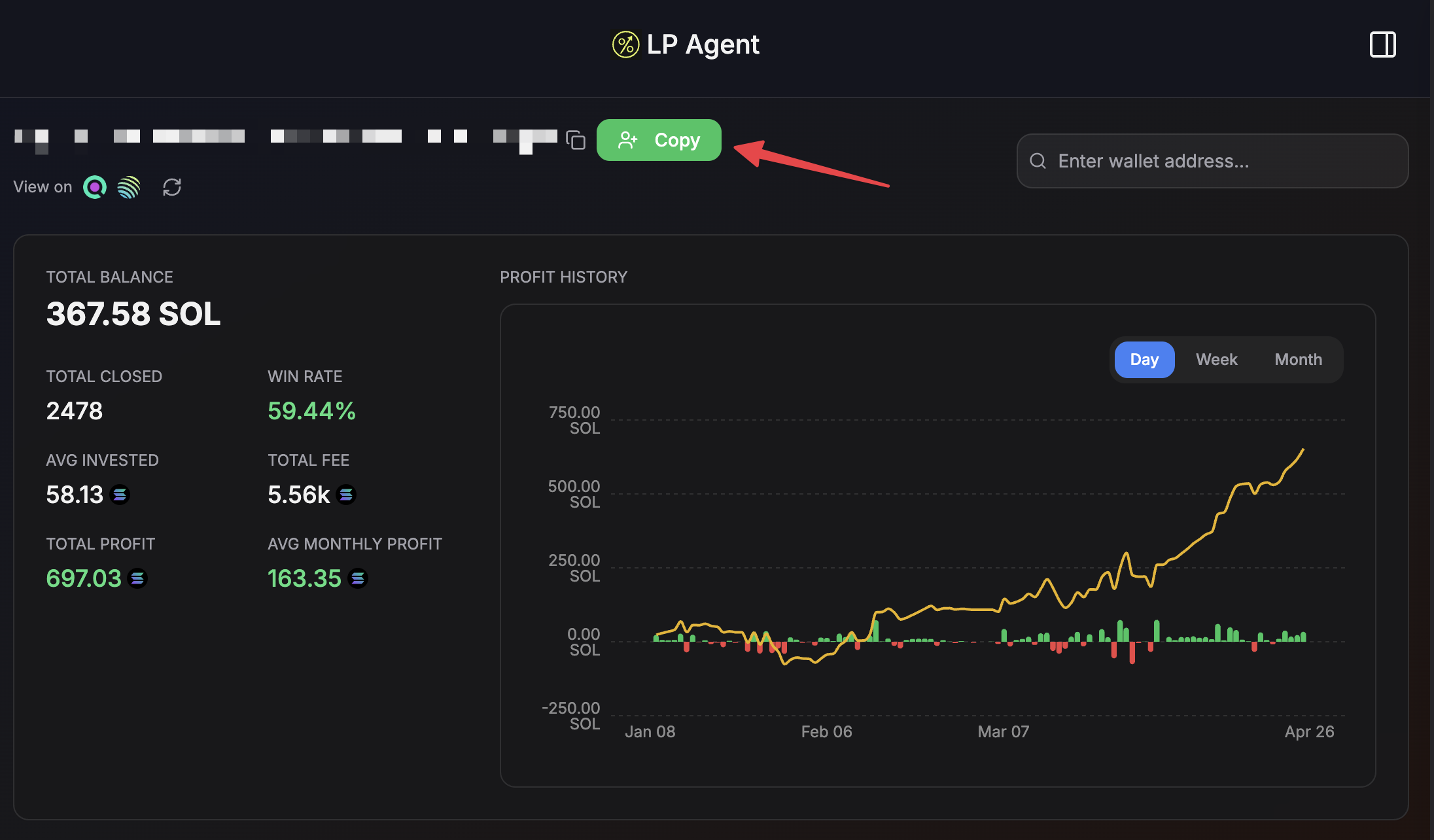
Copy button
Once you've chosen a wallet, navigate to their profile and click the "Copy"
button.
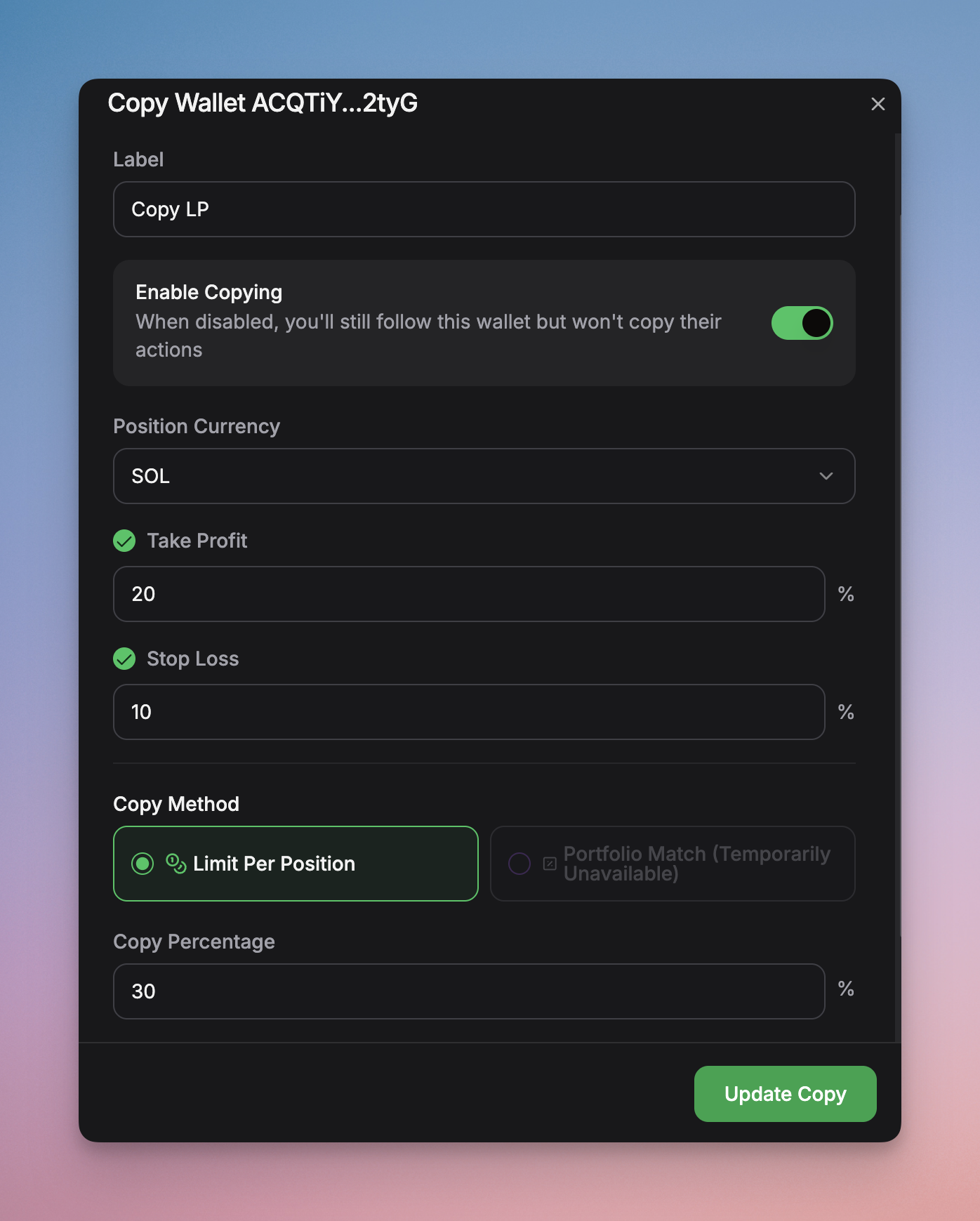
LP Agent Copy LP Setting
Set up your copy parameters:
* **Copy Percentage:** Allocate a percentage of value you want to copy
* **Max Amount:** Set a maximum total value (in SOL or USDC) that this copy strategy can use.
* **Take Profit (TP):** Automatically stop copying and secure profits when the copied position reaches a certain % gain.
* **Stop Loss (SL):** Automatically stop copying to limit potential losses if the copied position reaches a certain % loss.
Example:
* Your settings: **Copy 50%, Max amount \$30**
* If original wallet: Open a position `$20`, you open a position worth `$10` (`$20*50% = $10`)
* If original wallet: Open a position `$100`, you open a position worth `$30` (`$100*50% = $50` but it is bigger than Max Amount, so Max Amount is used)
Confirm your settings and activate the copy trade. LP Agent will now
automatically replicate the selected wallet's LP actions within your defined
parameters.
## Key Configuration Details
* **Proportional Copying:** Trades are typically copied proportionally based on the percentage you allocate relative to the copied wallet's size and your available capital.
* **Risk Management:** TP and SL settings apply specifically to your copied position, allowing you to manage risk independently.
* **Dynamic Adjustments:** LP Agent monitors the source wallet and automatically adjusts your copied position when they make changes (e.g., rebalancing, adding/removing liquidity), respecting your max amount and risk settings.
## Frequently Asked Questions
Delegating authority to a separate, dedicated wallet allows LP Agent to
execute copy trades automatically on your behalf without needing permission
for every single transaction. Funding this specific wallet defines the
capital allocated exclusively for your Copy LP activities, separating it
from your main funds and enhancing security. It ensures LP Agent can only
access the funds you've explicitly designated for copying.
When you copy a wallet, LP Agent monitors the source wallet's LP actions on
supported protocols (Meteora). When they open, close, or modify a position,
our system automatically replicates that action in your account, scaled
according to your settings.
Yes, you can copy multiple wallets simultaneously, allocating different
amounts or percentages of your capital to each, as long as you have
sufficient funds.
When the source wallet opens a new position, LP Agent will automatically
perform a "zap-in" transaction for you using your chosen base token
(typically SOL or USDC) to create the equivalent position according to your
copy settings (percentage, max amount). Similarly, when the source wallet
closes a position, LP Agent will automatically "zap-out" your corresponding
position, converting the assets back to your base token.
Your copied position will automatically follow the changes made by the
source wallet, provided the actions align with your configured settings (Max
Amount, TP, SL).
Please refer to our standard [Fee Structure](/fee) documentation. The usual
zap-in/zap-out fees apply if single-token operations are required to
replicate trades. There are no specific *additional* fees just for copying.
You can stop copying any wallet at any time through your dashboard. Go to
your "Copy LP" section, select the active copy, and choose the "Disable"
option.
While Copy LP Trading allows you to leverage the expertise of others, it
still involves risks. Past performance is not indicative of future results.
The wallet you copy might make poor decisions, or market conditions could
change rapidly. Always use the risk management tools (SL/TP, Max Amount) and
only invest capital you can afford to lose.
Your copied position will be closed or adjusted based on whichever condition
is met first: either your predefined TP/SL level is reached, or the wallet
you are copying takes an action (e.g., closes their position). This ensures
your risk management settings are respected while still following the source
wallet's activity.
Copy LP Trading is a powerful tool, but it's important to understand the risks
and configure your settings carefully.
 Copy button
Once you've chosen a wallet, navigate to their profile and click the "Copy"
button.
Copy button
Once you've chosen a wallet, navigate to their profile and click the "Copy"
button.
 LP Agent Copy LP Setting
Set up your copy parameters:
* **Copy Percentage:** Allocate a percentage of value you want to copy
* **Max Amount:** Set a maximum total value (in SOL or USDC) that this copy strategy can use.
* **Take Profit (TP):** Automatically stop copying and secure profits when the copied position reaches a certain % gain.
* **Stop Loss (SL):** Automatically stop copying to limit potential losses if the copied position reaches a certain % loss.
Example:
* Your settings: **Copy 50%, Max amount \$30**
* If original wallet: Open a position `$20`, you open a position worth `$10` (`$20*50% = $10`)
* If original wallet: Open a position `$100`, you open a position worth `$30` (`$100*50% = $50` but it is bigger than Max Amount, so Max Amount is used)
LP Agent Copy LP Setting
Set up your copy parameters:
* **Copy Percentage:** Allocate a percentage of value you want to copy
* **Max Amount:** Set a maximum total value (in SOL or USDC) that this copy strategy can use.
* **Take Profit (TP):** Automatically stop copying and secure profits when the copied position reaches a certain % gain.
* **Stop Loss (SL):** Automatically stop copying to limit potential losses if the copied position reaches a certain % loss.
Example:
* Your settings: **Copy 50%, Max amount \$30**
* If original wallet: Open a position `$20`, you open a position worth `$10` (`$20*50% = $10`)
* If original wallet: Open a position `$100`, you open a position worth `$30` (`$100*50% = $50` but it is bigger than Max Amount, so Max Amount is used)