> ## Documentation Index
> Fetch the complete documentation index at: https://docs.lpagent.io/llms.txt
> Use this file to discover all available pages before exploring further.

# Automation Model

> Understanding LP Agent's secure automation system

## How LP Agent Works

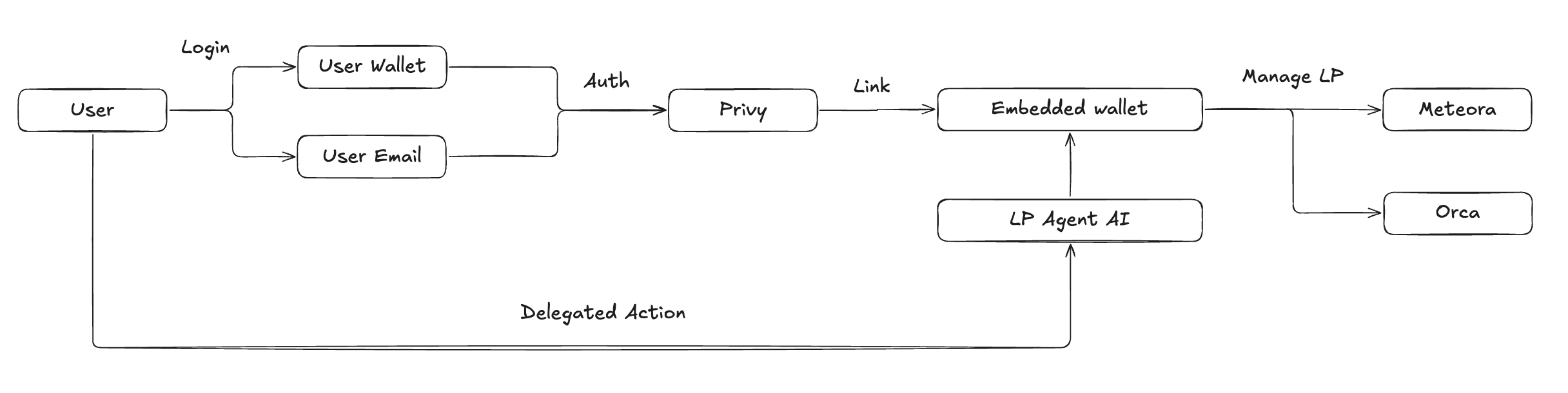
Our automation model combines secure authentication, embedded wallets, and AI-powered management to create a seamless and secure DeFi experience.

<Frame>
  <img src="https://mintcdn.com/lpagent/XQ4ljRqTyeNDfiva/images/auth-flow.png?fit=max&auto=format&n=XQ4ljRqTyeNDfiva&q=85&s=bdc1eada79292294d73abff2e09eb50f" alt="Authentication Flow" width="2432" height="610" data-path="images/auth-flow.png" />

  <em>LP Agent's Authentication and Automation Flow</em>
</Frame>

## Understanding the Flow

<Steps>
  <Step title="User Authentication">
    Two ways to get started: - Connect your existing wallet - Sign in with email
    login
  </Step>

  <Step title="Privy Integration">
    Secure authentication through Privy: - Enterprise-grade security - SOC2 Type
    2 certified - Bank-level encryption
  </Step>

  <Step title="Embedded Wallet">
    Automatically receive a secure DeFi wallet: - Non-custodial - Full user
    control - Seamless integration
  </Step>

  <Step title="AI Management">
    LP Agent AI connects to your embedded wallet to: - Manage positions -
    Execute strategies - Optimize returns
  </Step>
</Steps>

## Why This Model?

<CardGroup cols={2}>
  <Card title="24/7 Management" icon="robot">
    Let our AI handle everything while you sleep:

    <div className="mt-4 space-y-3">
      <div className="flex items-center gap-2">
        <div className="text-primary">
          <Icon className="w-5 h-5" icon="arrows-rotate" />
        </div>

        <span>Automatic rebalancing</span>
      </div>

      <div className="flex items-center gap-2">
        <div className="text-primary">
          <Icon className="w-5 h-5" icon="coins" />
        </div>

        <span>Fee collection</span>
      </div>

      <div className="flex items-center gap-2">
        <div className="text-primary">
          <Icon className="w-5 h-5" icon="chart-line" />
        </div>

        <span>Position optimization</span>
      </div>

      <div className="flex items-center gap-2">
        <div className="text-primary">
          <Icon className="w-5 h-5" icon="shield" />
        </div>

        <span>Risk management</span>
      </div>
    </div>
  </Card>

  <Card title="Maximum Returns" icon="chart-line">
    Never miss an opportunity:

    <div className="mt-4 space-y-3">
      <div className="flex items-center gap-2">
        <div className="text-primary">
          <Icon className="w-5 h-5" icon="clock" />
        </div>

        <span>Optimal entry/exit timing</span>
      </div>

      <div className="flex items-center gap-2">
        <div className="text-primary">
          <Icon className="w-5 h-5" icon="arrow-trend-up" />
        </div>

        <span>Automated compounding</span>
      </div>

      <div className="flex items-center gap-2">
        <div className="text-primary">
          <Icon className="w-5 h-5" icon="sliders" />
        </div>

        <span>Dynamic range adjustment</span>
      </div>

      <div className="flex items-center gap-2">
        <div className="text-primary">
          <Icon className="w-5 h-5" icon="sack-dollar" />
        </div>

        <span>Profit taking</span>
      </div>
    </div>
  </Card>
</CardGroup>

## Your Security is Our Priority

### Protected by Privy

<div className="flex items-center gap-3 mb-4">
  <img src="https://mintcdn.com/lpagent/XQ4ljRqTyeNDfiva/images/privy-logo-light.png?fit=max&auto=format&n=XQ4ljRqTyeNDfiva&q=85&s=f49e0f0cb122adc8f68982f155d06858" alt="Privy" className="h-8 block dark:hidden" width="778" height="175" data-path="images/privy-logo-light.png" />

  <img src="https://mintcdn.com/lpagent/XQ4ljRqTyeNDfiva/images/privy-logo-dark.png?fit=max&auto=format&n=XQ4ljRqTyeNDfiva&q=85&s=e09b201cf068d0aac1483b509d0b5634" alt="Privy" className="h-8 hidden dark:block" width="778" height="175" data-path="images/privy-logo-dark.png" />

  <span className="text-sm text-gray-600 dark:text-gray-400">
    Enterprise-grade wallet infrastructure
  </span>
</div>

<CardGroup cols={2}>
  <Card title="Non-Custodial" icon="lock">
    Your funds stay under your control at all times. Only you have the keys.
  </Card>

  <Card title="Enterprise Grade" icon="shield-check">
    Bank-level security with SOC2 Type 2 certification
  </Card>
</CardGroup>

## Complete Control

<Warning>
  You maintain full control of your assets: - Withdraw funds from your embedded
  wallet at any time - Transfer to any external wallet whenever you want -
  Revoke AI automation permissions instantly - No lockup periods or restrictions
</Warning>

## Frequently Asked Questions

<AccordionGroup>
  <Accordion title="How does the automation work?">
    After authentication, our AI connects to your embedded wallet to manage positions according to your selected strategy. All actions are transparent and can be monitored through your dashboard.
  </Accordion>

  <Accordion title="Is my money safe?">
    Absolutely! Your funds remain under your control at all times. You can withdraw from your embedded wallet or revoke AI permissions at any moment. The AI can only manage positions within approved protocols.
  </Accordion>

  {" "}

  <Accordion title="What if I want to stop automation?">
    You can instantly revoke automation permissions at any time through your
    dashboard. Your positions and funds remain fully accessible to you, and you
    can withdraw them to any external wallet immediately.
  </Accordion>

  <Accordion title="Can I move my funds out of the embedded wallet?">
    Yes! Your embedded wallet is just like any other wallet - you can freely transfer funds in and out at any time. There are no lockups or restrictions.
  </Accordion>
</AccordionGroup>

<Note>
  Ready to maximize your returns? Enable automation to let our AI work for you
  24/7. Join thousands of users already benefiting from automated position
  management.
</Note>

<Card title="Start Earning" icon="rocket" href="/quickstart">
  Enable AI automation and start optimizing your returns today!

</Card>